
JavaScript · API v2
profirest-api.js
Klient Profirest API v2 pro JavaScript. Spáruje zařízení kódem, hlídá a obnovuje tokeny, přihlašuje zaměstnance PINem nebo čipem, opakuje, co opakovat má, a čte proud událostí. Jeden soubor bez závislostí pro prohlížeč, WebView na tabletech provozoven i Node.
The JavaScript client of Profirest API v2. It pairs devices by code, keeps the tokens fresh, signs employees in with a PIN or a card, repeats what is safe to repeat and reads the event feed. One file without dependencies for browsers, the WebViews on restaurant tablets and Node.
- Verze
- Version
- 1.1.0
- Smlouva API
- API contract
- 26.11.28
- Velikost
- Size
- js 72 kB · gzip 18 kB / min.js 25 kB · gzip 9 kB
- Prohlížeče
- Browsers
- Chrome/WebView 66+ · Safari 12.1+ · Firefox 57+
- Node
- 18+
Starší prohlížeče s async/await (Chrome 55, Safari 11, Firefox 52) klient spustí, ale bez
AbortController nemá časový limit ani rušení požadavků. Jednu obnovu tokenu napříč panely hlídá přes Web Locks
(Chrome 69, Safari 15.4, Firefox 96); bez nich přes značku v úložišti (localStorage), která souběh dvou panelů
zúží na desítky milisekund – aplikaci partnera v takovém prohlížeči přesto raději otevírejte v jednom panelu.
Older browsers with async/await (Chrome 55, Safari 11, Firefox 52) run the client, but
without AbortController it has no timeout and cannot cancel requests. It guards one token refresh across tabs
with Web Locks (Chrome 69, Safari 15.4, Firefox 96); without them with a mark in the storage (localStorage) that
narrows a race of two tabs to tens of milliseconds – still prefer one tab for a partner application in such a browser.
Za vás udělá to, co jinak musí každá aplikace napsat a hlavně nezapomenout: Idempotency-Key u každého
POST a stejný při opakování, Retry-After, obnovu tokenu jen jednou i při několika souběžných
požadavcích a v několika panelech prohlížeče, hlavičku Profirest-Staff-Token a chyby podle katalogu.
Cesty, těla a odpovědi jsou přesně podle reference API – klient nic nepřejmenovává.
It does what every application would otherwise have to write and, above all, not forget: an
Idempotency-Key on every POST, the same one on a retry, Retry-After, refreshing the
token only once even with several parallel requests and several browser tabs, the Profirest-Staff-Token
header and errors from the catalog. Paths, bodies and responses are exactly as in the API reference –
the client renames nothing.
Kde ho vzít
Getting the file
API ho servíruje samo, s Access-Control-Allow-Origin: *, takže ho načtete z jakékoli stránky:
The API serves it itself, with Access-Control-Allow-Origin: *, so any page can load it:
<script src="https://api.mujprofirest.cz/v2/profirest-api.min.js"></script>
<script>
  var api = new ProfirestApi({ clientId: 'profirest-dochazka' });
</script>
Adresy. Výchozí baseUrl je ostrá adresa
https://api.mujprofirest.cz (z ní načítá soubor i ukázka výše). Pracuje nad ostrými daty
restaurací, zkoušejte proto na testovací provozovně.
Addresses. The default baseUrl is the production address
https://api.mujprofirest.cz (the sample above loads the file from it too). It works on live restaurant
data, so test on a test restaurant.
| SouborFile | KdyWhen |
|---|---|
| profirest-api.min.js | do aplikací a stránek – minifikovaný (asi třetina velikosti), se zdrojovou mapou profirest-api.min.js.mapfor apps and pages – minified (about a third of the size), with the source map profirest-api.min.js.map |
| profirest-api.js | čitelný zdroj s komentáři – ke čtení a laděníthe readable source with comments – for reading and debugging |
| TypeScript | typy (.d.ts) a obojí v jednom archivutypes (.d.ts) and both files in one archive |
Aplikace na tabletech by měly mít kopii souboru u sebe, aby nastartovaly i bez sítě, a s novou verzí ji
vyměnit. V Node soubor stáhněte k aplikaci a načtěte přes require (je to UMD: v prohlížeči definuje
window.ProfirestApi, v Node module.exports).
Applications on tablets should keep a copy of the file so they start without a network, and replace it
with a new version. In Node, download the file next to your application and require it (it is UMD: in a
browser it defines window.ProfirestApi, in Node module.exports).
const ProfirestApi = require('./profirest-api.js');
const api = new ProfirestApi({ clientId: 'your-client-id', storage: fileStorage('profirest.json') });
Rychlý start
Quick start
Spárovat zařízení
Pair a device
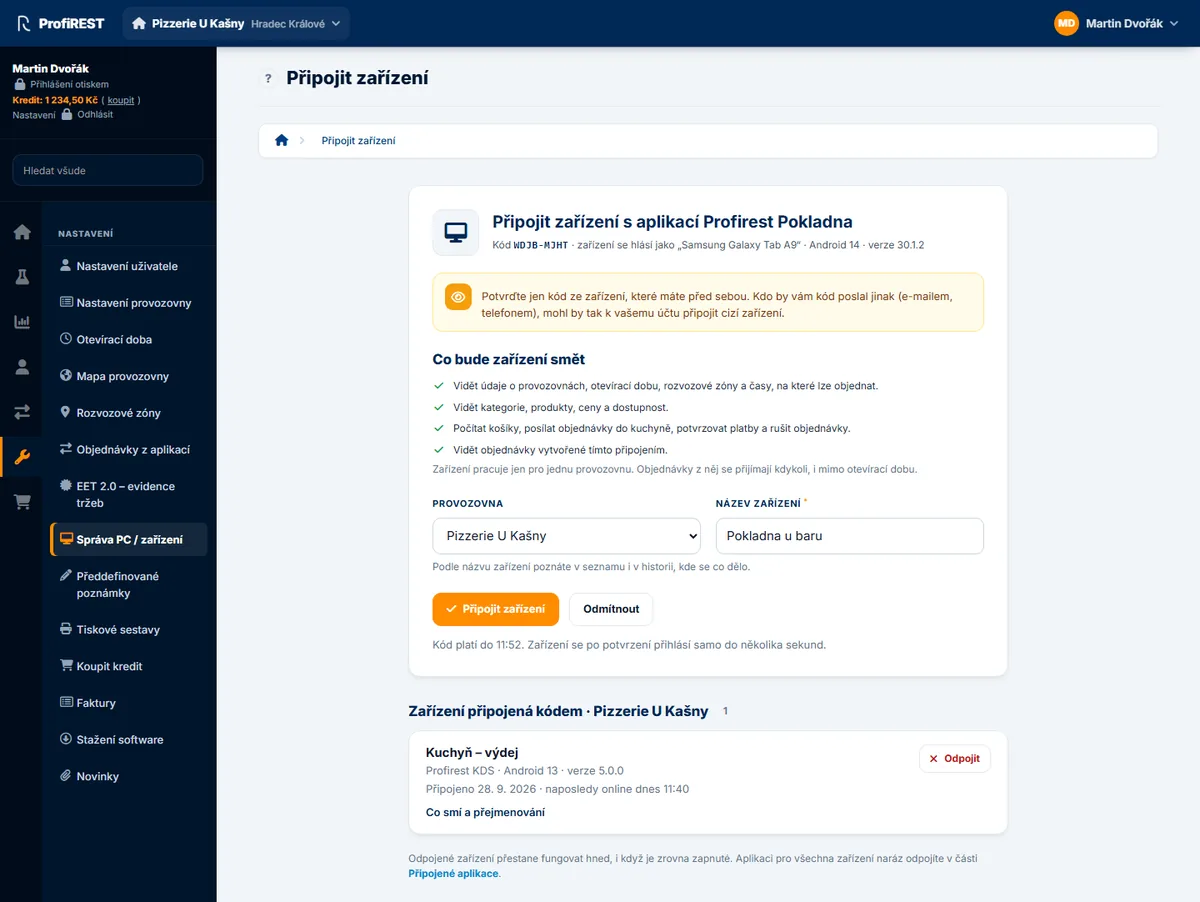
Pokladna, kuchyňský displej, docházkový terminál a telefon kurýra se připojují kódem (RFC 8628). Zařízení ukáže kód, vedoucí ho zadá v administraci a zařízení si samo vyzvedne tokeny. Zařízení pak pracuje jen pro jednu provozovnu a vedoucí ho může kdykoli odpárovat.
Registers, kitchen displays, attendance terminals and courier phones connect with a code (RFC 8628). The device shows a code, a manager enters it in the administration and the device picks up its tokens itself. The device then works for one restaurant only and the manager can unpair it at any time.
Spárujte zařízeníPair this device
BCDF-GHJK
mujprofirest.cz → Správa PC / zařízení → Připojit kódemmujprofirest.cz → Správa PC / zařízení → Připojit kódem
api.pair()vrátí kóduserCode(vždy 8 souhlásek s pomlčkou) a adresuverificationUriCompletes vyplněným kódem – ukažte ji jako QR kód.- Vedoucí kód potvrdí a vybere provozovnu. Kód platí 10 minut.
pairing.connectedse splní objektem připojení. Tokeny jsou uložené aapi.restaurantIdje provozovna zařízení.
api.pair()returnsuserCode(always 8 consonants with a dash) andverificationUriCompletewith the code filled in – show it as a QR code.- A manager confirms the code and picks the restaurant. The code is valid for 10 minutes.
pairing.connectedresolves with the connection. The tokens are stored andapi.restaurantIdis the device's restaurant.
var api = new ProfirestApi({
  clientId: 'profirest-dochazka',
  onUnpaired: function () { showPairing(); }   // vedoucí zařízení odpároval
});

async function start() {
  if (!api.isPaired()) {
    var pairing = await api.pair({
      scope: 'restaurants:read staff:read staff:authenticate attendance:read attendance:punch',
      deviceName: 'Píchačka u vchodu',             // vedoucí název může změnit
      appVersion: '2.0.0'
    });
    showCode(pairing.userCode, pairing.verificationUriComplete);
    try {
      await pairing.connected;                     // čeká, než vedoucí kód potvrdí
    } catch (e) {
      // e.error: 'access_denied' (vedoucí odmítl) nebo 'expired_token' (10 minut bez potvrzení) – nabídněte nový kód
      return showPairingFailed(e.error);
    }
  }
  if (!api.restaurantId) {
    await api.connection();                        // provozovnu zapamatuje
  }
  showTerminal(api.restaurantId);
}
var api = new ProfirestApi({
clientId: 'profirest-dochazka',
onUnpaired: function () { showPairing(); } // a manager unpaired the device
});
async function start() {
if (!api.isPaired()) {
var pairing = await api.pair({
scope: 'restaurants:read staff:read staff:authenticate attendance:read attendance:punch',
deviceName: 'Entrance terminal', // the manager can rename it
appVersion: '2.0.0'
});
showCode(pairing.userCode, pairing.verificationUriComplete);
try {
await pairing.connected; // waits until the manager confirms the code
} catch (e) {
// e.error: 'access_denied' (refused) or 'expired_token' (10 minutes unconfirmed) – offer a new code
return showPairingFailed(e.error);
}
}
if (!api.restaurantId) {
await api.connection(); // remembers the restaurant
}
showTerminal(api.restaurantId);
}Zařízení se ptá podle interval ze serveru (5 s), po slow_down o 5 s déle a výpadek sítě
přečká, dokud kód platí; aktuální odstup ukazuje pairing.interval. Když člověk obrazovku s kódem opustí,
zavolejte pairing.cancel() – přijde-li potvrzení v dotazu, který už běží, zařízení je spárované
a connected se splní.
scope smí obsahovat jen oprávnění, která Profirest vaší aplikaci povolil.
The device polls at the server's interval (5 s), 5 s slower after slow_down, and rides
out a network outage while the code is valid; pairing.interval shows the current gap. When the person
leaves the code screen, call pairing.cancel() – if the confirmation arrives in a poll already running, the
device is paired anyway and connected resolves.
scope may hold only permissions Profirest allowed your application.
| AplikaceApplication | clientId |
|---|---|
| Pokladna a mobilní číšníkRegister and waiter app | profirest-pos |
| Kuchyňský displej, výdej, pořadníkKitchen display, pass, queue screen | profirest-kds |
| Docházkový terminálAttendance terminal | profirest-dochazka |
| Telefon kurýraCourier phone | profirest-kuryr |
Docházkový terminál
Attendance terminal
Na terminálu se nikdo nepřihlašuje – každé píchnutí nese PIN nebo čip. id píchnutí vznikne na
zařízení ve chvíli, kdy člověk píchl (ProfirestApi.uuid() dává UUIDv7 řazené podle času), a stejné
id server nikdy nezapíše dvakrát. Chyby se rozlišují podle e.code:
Nobody signs in on a terminal – every punch carries a PIN or a card. The punch id is made on the
device when the person punched (ProfirestApi.uuid() gives a time-ordered UUIDv7), and the server never
records the same id twice. Errors differ by e.code:
async function punch(type, pin, employeeId) {
  var body = {
    id: ProfirestApi.uuid(),
    type: type,                                    // clock_in, clock_out, break_start, break_end
    credential: { method: 'pin', secret: pin, employee_id: employeeId || null }
  };
  try {
    var r = await api.post('/restaurants/' + api.restaurantId + '/attendance/punches', body);
    showDone(r.employee.name, r.state);            // state: working, on_break, off
  } catch (e) {
    switch (e.code) {
      case 'staff_ambiguous':                      // stejný PIN má víc lidí: e.candidates = [{id, name}]
        return chooseEmployee(e.candidates, function (id) { punch(type, pin, id); });
      case 'staff_credentials_invalid': return showWrongPin();
      case 'staff_locked': return showLocked(e.retryAfter);           // sekundy do odemčení
      case 'attendance_state_conflict': return showMessage(e.title); // např. odchod bez příchodu
      case 'network_error':
      case 'timeout': return saveOffline(body);   // pošle se později dávkou
      default: return showMessage(e.title);
    }
  }
}
async function punch(type, pin, employeeId) {
var body = {
id: ProfirestApi.uuid(),
type: type, // clock_in, clock_out, break_start, break_end
credential: { method: 'pin', secret: pin, employee_id: employeeId || null }
};
try {
var r = await api.post('/restaurants/' + api.restaurantId + '/attendance/punches', body);
showDone(r.employee.name, r.state); // state: working, on_break, off
} catch (e) {
switch (e.code) {
case 'staff_ambiguous': // several people share the PIN: e.candidates = [{id, name}]
return chooseEmployee(e.candidates, function (id) { punch(type, pin, id); });
case 'staff_credentials_invalid': return showWrongPin();
case 'staff_locked': return showLocked(e.retryAfter); // seconds until unlocked
case 'attendance_state_conflict': return showMessage(e.title); // e.g. leaving without arriving
case 'network_error':
case 'timeout': return saveOffline(body); // sent later in a batch
default: return showMessage(e.title);
}
}
}Bez sítě
Without a network
Píchnutí uložte i s id a časem occurred_at a pošlete později dávkou (nejvýš 100). Každá
položka má vlastní výsledek. Offline záznamy přijme jen provozovna, která je v nastavení docházky povoluje, a jen do
nastaveného stáří. Frontu držte jen na zařízení – nese PINy.
Store the punch with its id and occurred_at and send it later in a batch (at most 100).
Every item gets its own result. Offline records are accepted only when the restaurant allows them in its attendance
settings, and only up to the age set there. Keep the queue on the device only – it carries PINs.
function saveOffline(body) {
  queue.push(Object.assign({ occurred_at: new Date().toISOString() }, body));
}

async function sendQueue() {
  var batch = queue.slice(0, 100);
  var r = await api.post('/restaurants/' + api.restaurantId + '/attendance/punches/batch', { items: batch });
  r.results.forEach(function (item) {
    if (item.status === 'rejected' && item.retryable) return;          // e.g. staff_locked: send again later
    if (item.status === 'rejected') reportToManager(item.id, item.problem);
    removeFromQueue(item.id);                                          // created, duplicate or final rejection
  });
}
Pokladna
Register
Zaměstnanec se přihlásí PINem nebo čipem a klient pak posílá jeho token v hlavičce
Profirest-Staff-Token u každého požadavku sám. Ceny, DPH i zaokrouhlení počítá server: náhled vrátí, co
zaplatit, účtenka se vystaví se stejnými položkami. Účtenka má vlastní id ze zařízení, takže opakování
nikdy nevystaví druhou. EET 2.0 eviduje server, zařízení certifikát nepotřebuje.
An employee signs in with a PIN or a card and the client then sends their token in the
Profirest-Staff-Token header with every request by itself. The server computes prices, VAT and rounding: the
preview returns what to pay, the receipt is issued with the same items. A receipt carries its own id made
on the device, so a retry never issues a second one. The server records EET 2.0; the device needs no certificate.
var rid = api.restaurantId;
await api.signInStaff(rid, { method: 'pin', secret: pin });   // 409 staff_ambiguous → e.candidates, as on the terminal

var items = [{ product_id: '4567', quantity: 2 }];
var preview = await api.post('/restaurants/' + rid + '/receipts/preview', { items: items });

var receipt = await api.post('/restaurants/' + rid + '/receipts', {
  id: ProfirestApi.uuid(),
  number: nextReceiptNumber(),
  issued_at: new Date().toISOString(),
  items: items,
  payments: [{ method: 'cash', amount: preview.cash_amount_due }]
});

await api.signOutStaff();
Zálohu místní databáze pošlete jako binární tělo; stažení vrací Blob:
Send a backup of the local database as a binary body; a download returns a Blob:
await api.post('/restaurants/' + rid + '/backups', zipBlob, {
  contentType: 'application/zip',
  query: { type: 'automatic', app_version: '3.4.1' },
  timeout: 120000
});
var blob = await api.get('/restaurants/' + rid + '/backups/' + backupId + '/content', { accept: 'application/zip' });
Kuchyňský displej
Kitchen display
Displej čte proud událostí a po každé změně si tabuli načte znovu. watchEvents si kurzor pamatuje
v úložišti, takže po restartu pokračuje tam, kde skončil; po 30 dnech nečinnosti zavolá onReset.
Změny ze staré kuchyně a pokladen v1 do proudu nejdou – tabuli proto načítejte i v pravidelném intervalu.
The display reads the event feed and reloads its board after every change. watchEvents keeps the
cursor in storage, so after a restart it continues where it stopped; after 30 days of inactivity it calls
onReset. Changes from the old kitchen app and v1 registers do not reach the feed – reload the board on a
timer as well.
var watcher = api.watchEvents({
  restaurantId: api.restaurantId,
  types: ['kitchen.ticket_updated', 'kitchen.shift_closed', 'order.created', 'order.status_changed'],
  interval: 3000,
  onEvents: function (events) { return reloadBoard(); },     // may return a Promise
  onReset: function () { return reloadBoard(); },
  onError: function (e) { showConnection(e.code !== 'network_error' && e.code !== 'timeout'); }
});
setInterval(reloadBoard, 30000);
// watcher.stop() when leaving the screen
Aplikace partnera v prohlížeči
A partner application in a browser
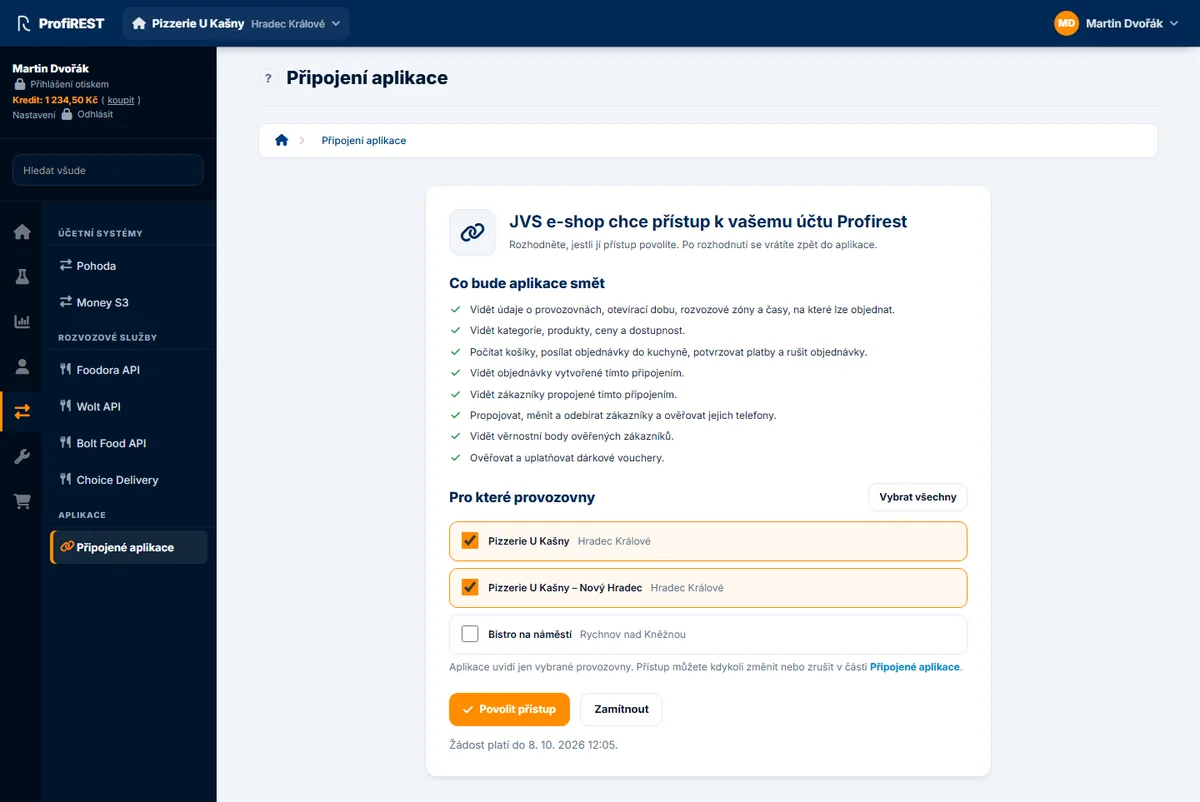
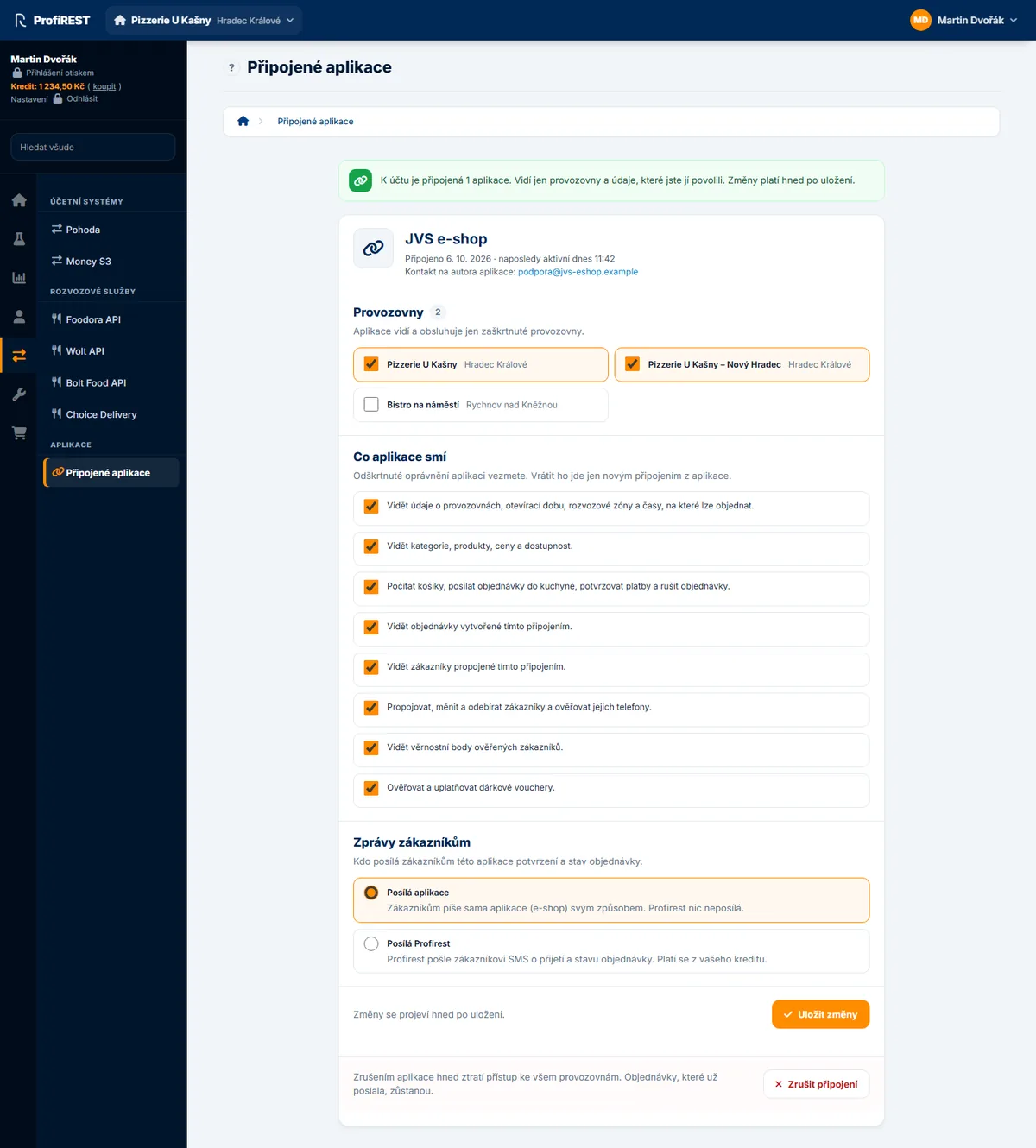
E-shop nebo jiná aplikace partnera se připojuje se souhlasem majitele restaurace (authorization code s PKCE).
V prohlížeči je to veřejný klient bez tajemství: adresu pro přesměrování i původ stránky (CORS) musí mít Profirest
u vašeho klienta zaregistrované. Klient vyrobí code_verifier a state, uloží je do
sessionStorage a po návratu ověří state i iss.
An e-shop or another partner application connects with the restaurant owner's consent (authorization code with
PKCE). In a browser it is a public client without a secret: Profirest must have your redirect URI and the page's origin
(CORS) registered for your client. The client makes the code_verifier and state, keeps them in
sessionStorage and checks state and iss on the way back.
Jedna instance = jedno připojení. Tokeny leží pod jedním storageKey
v úložišti klienta (v prohlížeči localStorage, společné všem panelům), rozpracovaný souhlas (ověřovač
PKCE a state pod <storageKey>:pkce) v sessionStorage panelu. Výchozí
profirest-api:<clientId> (bez clientId profirest-api:default) je jeden
pro celou aplikaci. Když váš systém připojuje víc majitelů restaurací, vytvořte pro každý připojený účet vlastní
instanci s vlastním storageKey odvozeným z ID účtu ve vašem systému – to znáte už před
přesměrováním na souhlas (třeba 'account-' + accountId). Se společným klíčem by dokončení souhlasu
dalšího majitele přepsalo tokeny předchozího a dva souhlasy rozběhnuté současně v jednom panelu by si přepsaly
state (první skončí chybou ProfirestApi.OAuthError s kódem invalid_request).
Víc provozoven jednoho majitele je jedno připojení (restaurant_ids) – tam stačí jeden klíč.
One instance = one connection. The tokens sit under one storageKey in the
client's storage (localStorage in a browser, shared by all tabs), a consent in progress (the PKCE
verifier and state under <storageKey>:pkce) in the tab's sessionStorage.
The default profirest-api:<clientId> (profirest-api:default without
clientId) is one for the whole application. When your system connects several restaurant owners, create
a separate instance for every connected account with its own storageKey derived from the account ID in
your system – you know it before the redirect to the consent (for example
'account-' + accountId). With a shared key, completing the next owner's consent would overwrite the
previous owner's tokens, and two consents started at the same time in one tab would overwrite each other's
state (the first one ends with a ProfirestApi.OAuthError with the code
invalid_request). Several restaurants of one owner are one connection (restaurant_ids) –
one key is enough there.
// one instance per connected account: accountId is the account in YOUR system (the same on the callback page)
var api = new ProfirestApi({ clientId: 'your-client-id', storageKey: 'account-' + accountId });

// the "Connect Profirest" button
location.href = await api.authorizationUrl({
  redirectUri: 'https://shop.example/profirest/callback',
  scope: 'restaurants:read catalog:read orders:write orders:read'
});

// on https://shop.example/profirest/callback
var connection = await api.completeAuthorization();   // reads code, state and iss from location.href
var restaurants = await api.all('/restaurants');
Veřejný klient smí refresh token použít jen jednou. Druhé použití téhož tokenu ukončí celé
připojení (ochrana proti ukradenému tokenu). Klient proto obnovuje jedním požadavkem i napříč panely prohlížeče
(Web Locks). Ve stejném původu nepoužívejte dvě instance se stejným storageKey mimo tento klient.
A public client may use a refresh token only once. Using the same token again ends the whole
connection (protection against a stolen token). The client therefore refreshes with a single request, also across
browser tabs (Web Locks). Do not use the same storageKey from code outside this client on the same
origin.
Na serveru (Node)
On a server (Node)
Aplikace s vlastním serverem je důvěrný klient: má clientSecret, který klient posílá jako HTTP
Basic. V prohlížeči ho konstruktor odmítne. Tokeny ukládejte do vlastního úložiště – stačí objekt s
getItem, setItem a removeItem. Pro každý připojený účet použijte vlastní instanci
s vlastním storageKey odvozeným z ID účtu ve vašem systému (viz Jedna instance = jedno
připojení). Na serveru leží v úložišti klienta pod tímto klíčem i rozpracovaný souhlas
(<storageKey>:pkce), takže se společným klíčem by si dva souhlasy běžící současně přepsaly
state i v různých prohlížečích.
An application with its own server is a confidential client: it has a clientSecret, which the client
sends as HTTP Basic. In a browser the constructor refuses it. Store the tokens in your own storage – any object with
getItem, setItem and removeItem will do. Use one instance per connected account
with its own storageKey derived from the account ID in your system (see One instance =
one connection). On a server the consent in progress (<storageKey>:pkce) sits under this key
in the client's storage too, so with a shared key two consents running at the same time would overwrite each other's
state even in different browsers.
const fs = require('fs');
const ProfirestApi = require('./profirest-api.js');

function fileStorage(path) {
  let data = {};
  try { data = JSON.parse(fs.readFileSync(path, 'utf8')); } catch (e) { /* first start */ }
  const save = () => fs.writeFileSync(path, JSON.stringify(data), { mode: 0o600 });
  return {
    getItem: (k) => (k in data ? data[k] : null),
    setItem: (k, v) => { data[k] = String(v); save(); },
    removeItem: (k) => { delete data[k]; save(); }
  };
}

const api = new ProfirestApi({
  clientId: 'your-client-id',
  clientSecret: process.env.PROFIREST_CLIENT_SECRET,
  storage: fileStorage('/var/lib/shop/profirest.json'),
  storageKey: 'account-7'
});
Připojení majitele proběhne stejně jako v prohlížeči: authorizationUrl() při přesměrování
a completeAuthorization(adresaZpětnéhoVolání) na zpětném volání. code_verifier je mezitím
v úložišti klienta. Když už tokeny máte odjinud, předejte accessToken: klient ho pošle a neobnovuje.
Connecting an owner works as in a browser: authorizationUrl() for the redirect and
completeAuthorization(callbackUrl) on the callback, with the code_verifier kept in the client's
storage meanwhile. When you already have tokens from elsewhere, pass accessToken: the client sends it and
never refreshes it.
Jak to funguje
How it works
Požadavky
Requests
Cesty se píšou relativně k /v2, přesně jako v referenci. Objekt v těle se pošle jako JSON;
Blob, ArrayBuffer nebo pole bajtů jako binární tělo s contentType. Odpověď JSON
přijde jako objekt, 204 jako null a jiný obsah jako Blob.
Paths are relative to /v2, exactly as in the reference. An object body is sent as JSON; a
Blob, ArrayBuffer or byte array as a binary body with contentType. A JSON answer
comes back as an object, 204 as null and any other content as a Blob.
var catalog = await api.get('/restaurants/11/catalog', { query: { channel: 'pos' } });
var quote = await api.post('/restaurants/11/quotes', { fulfillment: { type: 'pickup' }, items: items });

// ETag and Location: withResponse
var r = await api.get('/customers/' + id, { withResponse: true });
await api.patch('/customers/' + id, { name: 'Jana Nováková' }, { ifMatch: r.headers.get('ETag') });

// nothing changed since the last read: 304 comes back as null (withResponse: status 304)
var fresh = await api.get('/restaurants/11/catalog', { ifNoneMatch: catalogEtag, withResponse: true });
if (fresh.status !== 304) { catalog = fresh.data; catalogEtag = fresh.headers.get('ETag'); }

// your own Idempotency-Key, e.g. kept with an order in your database
await api.post('/restaurants/11/orders', order, { idempotencyKey: order.localId });
U POST klient přidá Idempotency-Key sám (UUIDv7) a při automatickém opakování pošle
stejný. Když požadavek po chybě opakujete vy, třeba po restartu aplikace, předejte vlastní klíč uložený u záznamu –
jen tak server pozná, že jde o tentýž požadavek. Účtenky a píchnutí se místo klíče řídí vlastním id
v těle.
On a POST the client adds an Idempotency-Key itself (UUIDv7) and sends the same one on
an automatic retry. When you repeat a request yourself, for example after the application restarted, pass your own key
stored with the record – only then does the server know it is the same request. Receipts and punches go by their own
id in the body instead of the key.
Opakování po pádu aplikace. Klíč, který klient u POST vytvoří sám, žije jen
v paměti procesu a nikam se nevrací. Když aplikace spadne nebo se restartuje mezi odesláním požadavku a uložením
odpovědi, nový pokus by dostal nový klíč a server by ho vzal jako nový požadavek. U zápisů, které se nesmí provést
dvakrát (třeba objednávka):
Retrying after a crash. The key the client creates on its own for a POST
lives only in the memory of the process and is never handed back. When the application crashes or restarts between
sending a request and storing its answer, a new attempt would get a new key and the server would take it as a new
request. For writes that must not happen twice (an order, for example):
- klíč vytvořte sami (
ProfirestApi.uuid()) a uložte ho k záznamu ve své databázi dřív, než požadavek odešlete; - pošlete ho volbou
idempotencyKey; - po restartu pošlete stejný požadavek se stejným klíčem i tělem – server vrátí původní odpověď a nic nezapíše podruhé.
- create the key yourself (
ProfirestApi.uuid()) and store it with the record in your database before you send the request; - send it in the
idempotencyKeyoption; - after a restart send the same request with the same key and the same body – the server returns the original answer and writes nothing a second time.
// 1. before sending: create the key and store it with the order in your database
order.idempotencyKey = ProfirestApi.uuid();
await saveOrder(order);
// 2. send it; 3. after a restart send the stored order again – the same key and the same body
var created = await api.post('/restaurants/11/orders', order.body, { idempotencyKey: order.idempotencyKey });
Výsledek pod klíčem server drží 24 hodin (odpověď 5xx se neukládá – opakování proběhne znovu); stejný klíč
s jiným tělem skončí 422 idempotency_key_mismatch. Objednávka má navíc dvě pojistky nezávislé na klíči:
kalkulaci (quote_id) jde použít jen jednou (409 quote_already_used) a vaše
external_id objednávky je trvalé (409 external_id_conflict). V obou případech je
v e.existingId ID už založené objednávky – načtěte ji místo zakládání nové. Účtenky a píchnutí docházky
nesou vlastní id v těle, které slouží jako klíč – i to vytvořte a uložte předem.
The server keeps the result under the key for 24 hours (a 5xx answer is not stored – a retry runs again);
the same key with a different body ends with 422 idempotency_key_mismatch. An order also has two
safeguards independent of the key: a quote (quote_id) can be used only once
(409 quote_already_used) and your external_id of the order is permanent
(409 external_id_conflict). In both cases e.existingId holds the ID of the order already
created – load it instead of creating a new one. Receipts and attendance punches carry their own id in
the body, which serves as the key – create and store it in advance too.
Chyby
Errors
Každá chyba API přijde jako ProfirestApi.ApiError s kódem z katalogu
chyb. Rozhodujte se podle code, ne podle HTTP stavu – kódy se nikdy nemění. title je
česky nebo anglicky podle volby language.
Every API error comes as a ProfirestApi.ApiError with a code from the
error catalog. Branch on code, not on the HTTP status – codes never change.
title is Czech or English according to the language option.
| VlastnostProperty | ObsahContent |
|---|---|
| code | kód z katalogu, nebo kód klienta (níže)a catalog code, or a client code (below) |
| status | HTTP stav; 0, když odpověď nepřišlathe HTTP status; 0 when no answer came |
| title, detail | název pro člověka a popis konkrétního případua summary for a person and what happened in this case |
| errors | problémy u polí: pointer (JSON Pointer), code, messagefield problems: pointer (JSON Pointer), code, message |
| candidates | u staff_ambiguous: zaměstnanci se stejným PINemwith staff_ambiguous: employees sharing the PIN |
| existingId | u external_id_conflict a quote_already_used: existující objektwith external_id_conflict and quote_already_used: the existing object |
| retryAfter | sekundy z Retry-After, jinak nullseconds from Retry-After, otherwise null |
| retryable | má smysl opakovat (klient už to zkusil podle retries)worth repeating (the client has already tried, see retries) |
| requestId | uveďte ho, když kontaktujete podporuquote it when you contact support |
| problem | celé tělo chyby (RFC 9457)the whole error body (RFC 9457) |
Kódy jen z klienta
Client-only codes
| code | status | KdyWhen |
|---|---|---|
| network_error | 0 | server nejde zastihnout (bez sítě, DNS, CORS); opakovatelnéthe server cannot be reached (no network, DNS, CORS); retryable |
| timeout | 0 | odpověď nepřišla do timeout; opakovatelnéno answer within timeout; retryable |
| unexpected_redirect | 3xx / 0 | server odpověděl přesměrováním; klient ho nesleduje, aby tokeny neodešly jinam (Location je v detail, v prohlížeči status 0); neopakuje sethe server answered with a redirect; the client does not follow it so tokens never go elsewhere (Location is in detail, status 0 in a browser); not retried |
| not_paired | 401 | zařízení nemá tokeny, nebo ho server odpároval; zavolá se onUnpaired – spárujte znovuthe device has no tokens or the server unpaired it; onUnpaired is called – pair again |
| staff_session_required | 403 | požadavek s staff: true bez přihlášeného zaměstnance – nic se neposlaloa request with staff: true and nobody signed in – nothing was sent |
Chyby párování a připojení partnera jsou ProfirestApi.OAuthError s kódem OAuth v error
(access_denied, expired_token, invalid_request…) a popisem v description.
Errors of pairing and of connecting a partner are ProfirestApi.OAuthError with the OAuth code in
error (access_denied, expired_token, invalid_request…) and the text in
description.
Opakování a výpadky
Retries and outages
Klient zopakuje jen to, co opakovat jde, nejvýš retrieskrát (výchozí 3), se stejným tělem
a Idempotency-Key. Odstup se zdvojnásobuje od retryDelay (1 s) do 30 s a má rozptyl ±25 %,
aby se zařízení po výpadku nevrátila všechna najednou. Retry-After má přednost; delší než
maxRetryWait (30 s) klient nečeká a vrátí chybu s retryAfter.
The client repeats only what can be repeated, at most retries times (3 by default), with the same body
and Idempotency-Key. The delay doubles from retryDelay (1 s) up to 30 s with ±25 % jitter, so
devices do not all come back at once after an outage. Retry-After wins; longer than
maxRetryWait (30 s), the client does not wait and returns the error with retryAfter.
| OdpověďAnswer | OpakujeRepeats | PoznámkaNote |
|---|---|---|
| network_error, timeout | anoyes | i POST – klíč je stejnýa POST too – the key is the same |
| 429 rate_limited | anoyes | po Retry-Afterafter Retry-After |
| 409 idempotency_in_progress | anoyes | stejný požadavek ještě běžíthe same request is still running |
| 500, 502, 503, 504 | anoyes | 5xx se na serveru neukládá, opakování proběhne znovua 5xx is not stored by the server, so the retry runs again |
| 401 invalid_token | jednouonce | po obnově tokenuafter refreshing the token |
| 429 staff_locked | neno | zámek po špatných PINech – ukažte, kdy to zkusita lock after wrong PINs – show when to try again |
| ostatní 4xxother 4xx | neno | opravte požadavek nebo ukažte titlefix the request or show title |
Každý pokus má limit timeout (30 s) na celou odpověď, i na přečtení těla. Požadavek zrušíte přes
signal (AbortController); zrušený požadavek se neopakuje a vyhodí AbortError.
Every attempt has a timeout (30 s) for the whole answer, reading the body included. Cancel a request with
signal (AbortController); a cancelled request is not repeated and throws an
AbortError.
Tokeny a úložiště
Tokens and storage
Access token platí 30 minut. Klient ho obnoví minutu před koncem (refreshMargin), a když server
odpoví 401 invalid_token dřív, obnoví ho a požadavek jednou zopakuje. Souběžné požadavky čekají na jednu
obnovu; v prohlížeči i mezi panely přes Web Locks, a když panel obnoví token, ostatní použijí jeho.
An access token lives 30 minutes. The client refreshes it a minute before it ends (refreshMargin),
and when the server answers 401 invalid_token earlier, it refreshes and repeats the request once. Parallel
requests wait for one refresh; in a browser also across tabs through Web Locks, and when one tab refreshed, the others use
its token.
Spárované zařízení smí obnovu se stejným refresh tokenem zopakovat, dokud nový refresh token nepoužije, nejdéle
24 hodin – když se odpověď ztratí ve výpadku Wi-Fi, zařízení zůstane spárované. Mimo tuto lhůtu a u aplikací
v prohlížeči ukončí opětovné použití celé připojení. Když obnova selže s invalid_grant (zařízení někdo
odpároval nebo refresh token vypršel po 90 dnech bez použití), klient tokeny smaže, zavolá onUnpaired
a požadavky končí not_paired. invalid_client a unauthorized_client jsou
přechodné (třeba zámek po chybných tajemstvích) – tokeny zůstanou a chyba přijde volajícímu.
A paired device may repeat a refresh with the same refresh token until it has used the new refresh token, at
most 24 hours – when the answer is lost in a Wi-Fi outage, the device stays paired. Outside this window, and for
applications in a browser, reuse ends the whole connection. When a refresh fails with invalid_grant
(someone unpaired the device or the refresh token expired after 90 days unused), the client deletes the tokens, calls
onUnpaired and requests end with not_paired. invalid_client and
unauthorized_client are temporary (for example a lock after wrong secrets) – the tokens stay and the error
goes to the caller.
| V úložištiIn storage | ObsahContent |
|---|---|
| access_token, refresh_token | tokeny zařízení nebo připojeníthe device's or connection's tokens |
| expires_at, scope | konec access tokenu (ms) a oprávněníwhen the access token ends (ms) and the scopes |
| restaurant_id, device_id | provozovna a zařízení z connection()restaurant and device from connection() |
| events_cursor:… | kurzor proudu událostí pro danou provozovnu a typythe event cursor for the restaurant and types |
Vše leží pod jedním klíčem profirest-api:<clientId> (volba storageKey)
v localStorage; bez něj (anonymní okno) jen v paměti do zavření stránky. Token zaměstnance se neukládá
nikdy. api.unpair() vše zapomene a refresh token na serveru zneplatní.
Everything sits under one key profirest-api:<clientId> (the storageKey option) in
localStorage; without it (a private window) only in memory until the page closes. The staff token is never
stored. api.unpair() forgets everything and revokes the refresh token on the server.
Přihlášený zaměstnanec
Signed-in employee
signInStaff() vrátí relaci z POST …/staff-sessions a token si drží jen v paměti. Volba
staff u požadavku říká, co s ním: 'auto' (výchozí) ho pošle, když je někdo přihlášený,
true přihlášení vyžaduje, false ho nepošle a řetězec pošle jako token. Relace vyprší po
nečinnosti (idle_timeout_seconds, každý požadavek ji prodlouží) a nejpozději v max_expires_at.
Když server odpoví staff_session_expired nebo staff_session_required, nebo relace skončí podle
hodin zařízení, klient relaci zapomene a zavolá onStaffExpired. staff: true funguje jen u adres
API – u cizí adresy je to chyba.
signInStaff() returns the session from POST …/staff-sessions and keeps the token in
memory only. The staff option of a request says what to do with it: 'auto' (default) sends it when
somebody is signed in, true requires a sign-in, false leaves it out and a string is sent as the
token. The session expires after inactivity (idle_timeout_seconds, every request extends it) and at
max_expires_at at the latest. When the server answers staff_session_expired or
staff_session_required, or the session ends by the clock of the device, the client forgets the session and
calls onStaffExpired. staff: true works only for addresses of the API – elsewhere it is an
error.
try {
  await api.signInStaff(rid, { method: 'card', secret: cardNumber });
} catch (e) {
  if (e.code === 'staff_locked') return showLocked(e.retryAfter);
  throw e;
}
api.staff;   // { employee: { id, name, roles, … }, restaurantId, expiresAt: Date|null, maxExpiresAt: Date|null } or null
Proud událostí
Event feed
watchEvents() čte živý proud GET /v2/events/stream (Server-Sent Events), když služba
proudu běží – události přijdou pár sekund po změně bez dotazování a po výpadku spojení se doženou podle kurzoru
(Last-Event-ID). Když proud neběží (503, starší server, prostředí bez čtení odpovědi po kouscích),
čte GET /v2/events dokola a o proud se pokusí znovu později; kurzor je v obou stejný.
isStreaming() řekne, co právě běží.
Kurzor posune a uloží až po úspěšném
onEvents – když obsluha vyhodí chybu, stejné události přijdou znovu (aspoň jednou), proto je zpracovávejte
tak, aby opakování nevadilo. Plnou stránku dožene hned, jinak čeká interval. Bez uloženého kurzoru začne
na konci proudu (staré události nečte). Při chybě čeká déle, až 60 s; ztráta spárování čtení ukončí.
watchEvents() reads the live stream GET /v2/events/stream (Server-Sent Events) while
the stream service runs – events come a few seconds after the change without polling, and after a lost connection they
are caught up by the cursor (Last-Event-ID). When the stream is not running (503, an older
server, an environment that cannot read a response in pieces), it reads GET /v2/events over and over and
tries the stream again later; the cursor is the same in both. isStreaming() tells which one runs.
It moves and stores the cursor only
after onEvents succeeded – when your handler throws, the same events come again (at least once), so handle
them so that a repeat does no harm. A full page is caught up at once, otherwise it waits interval. Without a
stored cursor it starts at the end of the feed (no old events). After an error it waits longer, up to 60 s; losing the
pairing stops it.
| VolbaOption | VýchozíDefault | VýznamMeaning |
|---|---|---|
| onEvents(events) | – | pole událostí; může vrátit Promisean array of events; may return a Promise |
| onReset() | – | kurzor propadl (410 cursor_expired) – načtěte stav znovuthe cursor expired (410 cursor_expired) – reload your state |
| onError(error) | – | chyba čtení nebo obsluhyan error of reading or of your handler |
| restaurantId | null | jen události této provozovnyonly events of this restaurant |
| types | null | pole nebo řetězec typů, např. ['order.created']an array or string of types, e.g. ['order.created'] |
| interval | 5000 | ms mezi dotazyms between polls |
| limit | 100 | událostí na stránku, nejvýš 100 (víc proud nepřijme)events per page, at most 100 (the feed accepts no more) |
| persistCursor | true | kurzor do úložiště (klíč podle provozovny a typů)keep the cursor in storage (keyed by restaurant and types) |
| stream | true | číst živý proud, když běží (false = jen dotazování)read the live stream while it runs (false = polling only) |
| streamIdleTimeout | 70000 | ms bez dat, po kterých se spojení proudu bere jako mrtvé a naváže znovu (služba posílá : ping po 25 s ticha)ms without data after which the stream connection counts as dead and is opened again (the service sends : ping after 25 s of silence) |
Seznamy po stránkách
Paged lists
Seznamy vrací { data, next_cursor }. all() projde všechny stránky a vrátí položky,
pages() dává stránky po jedné – v prohlížečích s for await i v cyklu.
Lists return { data, next_cursor }. all() walks every page and returns the items,
pages() yields the pages one by one – in browsers with for await also in a loop.
var staff = await api.all('/restaurants/11/staff', { query: { limit: 100 } });

for await (var page of api.pages('/restaurants/11/attendance/presence')) {
  render(page.data);
}
Reference
Volby klienta
Client options
var api = new ProfirestApi(options);| VolbaOption | VýchozíDefault | VýznamMeaning |
|---|---|---|
| baseUrl | https://api.mujprofirest.cz | adresa API, výchozí je ostrá – viz Adresythe API address, production by default – see Addresses |
| clientId | – | client_id aplikace; potřeba pro párování, obnovu a PKCEyour client_id; needed for pairing, refreshing and PKCE |
| clientSecret | – | jen na serveru; v prohlížeči konstruktor vyhodí chybuserver only; in a browser the constructor throws |
| accessToken | – | pevný token bez obnovya fixed token, never refreshed |
| language | 'cs' | Accept-Language: jazyk title v chybách (cs, en)Accept-Language: the language of title in errors (cs, en) |
| storage | localStorage | objekt s getItem, setItem, removeItem; bez localStorage paměťan object with getItem, setItem, removeItem; memory without localStorage |
| storageKey | 'profirest-api:' + clientId | klíč v úložištithe key in storage |
| retries | 3 | opakování opakovatelných chybretries of retryable errors |
| retryDelay | 1000 | první odstup v ms, pak dvojnásobky do 30 sthe first delay in ms, then doubling up to 30 s |
| maxRetryWait | 30 | nejdelší Retry-After v sekundách, na který klient čekáthe longest Retry-After in seconds the client waits for |
| timeout | 30000 | ms na odpověď jednoho pokusums for one attempt's answer |
| refreshMargin | 60 | kolik sekund před koncem access token obnovithow many seconds before its end to refresh the access token |
| onUnpaired(reason) | – | zařízení ztratilo spárování – ukažte párováníthe device lost its pairing – show pairing |
| onStaffExpired(error) | – | relace zaměstnance skončila – ukažte přihlášeníthe staff session ended – show the sign-in |
| fetch | fetch | vlastní fetch (testy, starší Node)your own fetch (tests, older Node) |
Metody
Methods
| MetodaMethod | VracíReturns | Co děláWhat it does |
|---|---|---|
| pair({ scope, deviceName, devicePlatform, appVersion }) | Promise<Pairing> | začne párování kódem; Pairing = userCode, verificationUri, verificationUriComplete, expiresAt, interval, connected, cancel()starts pairing by code; Pairing = userCode, verificationUri, verificationUriComplete, expiresAt, interval, connected, cancel() |
| isPaired() | boolean | jsou uložené tokenytokens are stored |
| connection() | Promise<Connection> | GET /connection; zapamatuje provozovnu a zařízeníGET /connection; remembers the restaurant and device |
| restaurantId, scopes | string | null, string[] | provozovna zařízení a oprávnění tokenuthe device's restaurant and the token's scopes |
| unpair() | Promise | zapomene vše a refresh token zneplatníforgets everything and revokes the refresh token |
| signInStaff(restaurantId, credential) | Promise<StaffSession> | { method: 'pin' | 'card', secret, employee_id? }{ method: 'pin' | 'card', secret, employee_id? } |
| signOutStaff(token?) | Promise | odhlásí přihlášeného; místně zapomene vždy. S tokenem (session.token ze signInStaff) ukončí jen tu relaci a jiného přihlášeného nechásigns the employee out; always forgets locally. With a token (session.token from signInStaff) it ends only that session and leaves another signed-in employee be |
| staff | object | null | přihlášený zaměstnanecthe signed-in employee |
| request(method, path, options) | Promise<any> | obecný požadavek (volby níže)a general request (options below) |
| get, post, put, patch, delete | Promise<any> | post(path, body, options) atd.post(path, body, options) and so on |
| all(path, options) | Promise<array> | položky všech stránekthe items of all pages |
| pages(path, options) | AsyncIterator | stránky po jednéthe pages one by one |
| watchEvents(options) | { stop(), isStreaming() } | čtení proudu událostíreading the event feed |
| authorizationUrl({ redirectUri, scope, prompt }) | Promise<string> | adresa souhlasu majitele (PKCE)the owner's consent URL (PKCE) |
| completeAuthorization(url?) | Promise<Connection> | ověří state a iss a vymění kód za tokenychecks state and iss and exchanges the code for tokens |
| ProfirestApi.uuid() | string | UUIDv7 pro id píchnutí, účtenek a inventura UUIDv7 for the id of punches, receipts and stock takings |
| ProfirestApi.offlineApproval.verifyPin(member, pin) | Promise<boolean> | kontrola překlepu v PINu vedoucího podle offline_approval.check – jen 8 bitů, PIN z ní zjistit nejdea typo check of the manager's PIN against offline_approval.check – only 8 bits, the PIN cannot be derived from it |
| ProfirestApi.offlineApproval.sign(member, pin, receipt) | Promise<string> | approval_signature offline schválené účtenky (PBKDF2 z PINu, HMAC-SHA256 zprávy); potřebuje crypto.subtlethe approval_signature of an offline-approved receipt (PBKDF2 of the PIN, HMAC-SHA256 of the message); needs crypto.subtle |
| ProfirestApi.offlineApproval.message(receipt) | string | podepisovaná zpráva (id, number, issued_at, approved_by_id, součet plateb)the signed message (id, number, issued_at, approved_by_id, total of payments) |
| ProfirestApi.memoryStorage() | storage | úložiště v paměti (testy)an in-memory storage (tests) |
| ProfirestApi.VERSION | '1.1.0' | verze klientathe client's version |
Volby požadavku
Request options
| VolbaOption | VýznamMeaning |
|---|---|
| query | parametry adresy; pole se spojí čárkou, null se vynecháquery parameters; arrays are joined with commas, null is left out |
| body, contentType | objekt jako JSON; Blob a bajty binárně s contentTypean object as JSON; a Blob or bytes as binary with contentType |
| idempotencyKey | vlastní klíč; false = bez klíčeyour own key; false = no key |
| ifMatch | ETag pro PATCHthe ETag for PATCH |
| ifNoneMatch | ETag z minulého čtení u GET – nezměněné vrátí null (s withResponse status 304)the ETag of the last read for GET – unchanged comes back as null (status 304 with withResponse) |
| staff | 'auto', true, false nebo token'auto', true, false or a token |
| retries, timeout, signal | přepíšou volby klienta pro tento požadavekoverride the client's options for this request |
| accept, headers | hlavička Accept (výchozí application/json) a další hlavičkythe Accept header (application/json by default) and other headers |
| withResponse | vrátí { status, headers, data }returns { status, headers, data } |
| auth | false = bez Authorizationfalse = no Authorization |
Bezpečnost
Security
- Tokeny v
localStoragepřečte každý skript na stránce. Na stránky zařízení nevkládejte cizí skripty (reklamy, měření) a nastavte Content-Security-Policy. clientSecretpatří jen na server. Konstruktor ho v prohlížeči odmítne.- Token zaměstnance zůstává jen v paměti a končí s nečinností. PIN klient nikam neukládá – posílá ho jen v těle požadavku přes HTTPS.
- Tokeny zařízení patří zařízení a jen jeho provozovně. Ztracené nebo ukradené zařízení odpárujte v administraci – jeho tokeny přestanou platit hned.
- Offline fronta docházkového terminálu nese PINy; držte ji jen na zařízení a po odeslání ji smažte.
- Any script on the page can read tokens in
localStorage. Do not put third-party scripts (ads, analytics) on device pages and set a Content-Security-Policy. clientSecretbelongs on a server only. The constructor refuses it in a browser.- The staff token stays in memory only and ends with inactivity. The client never stores a PIN – it only sends it in the request body over HTTPS.
- Device tokens belong to the device and its restaurant only. Unpair a lost or stolen device in the administration – its tokens stop working at once.
- The offline queue of an attendance terminal carries PINs; keep it on the device only and delete it once sent.
Změny
Changes
| VerzeVersion | DatumDate | Co se změniloWhat changed |
|---|---|---|
| 1.1.0 | 2026-11-03 | Smlouva 26.11.3. watchEvents čte
živý proud GET /v2/events/stream (Server-Sent Events) a bez něj dotazuje GET /v2/events; volby
stream a streamIdleTimeout, metoda isStreaming(). Výpadek spojení proudu se do
onError nehlásí – spojení se naváže samo a události se doženou podle kurzoru.Contract
26.11.3. watchEvents reads the live stream GET /v2/events/stream (Server-Sent Events) and polls
GET /v2/events without it; the options stream and streamIdleTimeout, the method
isStreaming(). A lost stream connection is not reported to onError – it reconnects by itself and
the events are caught up by the cursor. |
| 1.0.4 | 2026-10-02 | ProfirestApi.offlineApproval –
offline schválení účtenky vedoucím: verifyPin (kontrola překlepu podle offline_approval.check),
sign (approval_signature) a message. completeAuthorization maže uložené PKCE
až po kontrole state a iss, takže podvržený callback skutečné dokončení nezablokuje.ProfirestApi.offlineApproval
– offline approval of a receipt by a manager: verifyPin (a typo check against offline_approval.check),
sign (approval_signature) and message. completeAuthorization removes the stored
PKCE only after checking state and iss, so a forged callback cannot block the real one. |
| 1.0.3 | 2026-10-02 | Smlouva 2.0.5. Přesměrování se nesleduje
(redirect: 'manual') – odpověď 3xx kromě 304 je chyba unexpected_redirect, takže
Authorization ani Profirest-Staff-Token neodejdou na jiný server.Contract 2.0.5.
Redirects are not followed (redirect: 'manual') – a 3xx answer other than 304 is the
unexpected_redirect error, so neither Authorization nor Profirest-Staff-Token goes to
another server. |
| 1.0.2 | 2026-10-02 | Tajemství klienta v client_secret_basic
kódované jako formulář (mezera jako +, RFC 6749). Po souběžných 401 jen jedna obnova tokenu.
staff.expiresAt a maxExpiresAt jsou null, když relace limit nemá. Relace prošlá podle hodin
zařízení volá onStaffExpired. Accept a Accept-Language z headers bez ohledu
na velikost písmen. Cesta /v2?… bez dvojí předpony. pairing.interval ukazuje aktuální odstup.
staff: true u cizí adresy je chyba. timeout hlídá i čtení těla. signInStaff se po výpadku
sítě samo neopakuje (opakování se špatným PINem by se do zámku započítalo dvakrát).The client secret
in client_secret_basic is form-encoded (a space as +, RFC 6749). One token refresh after concurrent
401s. staff.expiresAt and maxExpiresAt are null when the session has no
such limit. A session ended by the clock of the device calls onStaffExpired. Accept and
Accept-Language from headers in any letter case. A /v2?… path without a double prefix.
pairing.interval shows the current gap. staff: true with a foreign address is an error.
timeout covers reading the body too. signInStaff is not repeated on its own after a network outage
(a repeat with a wrong PIN would count twice towards the lock). |
| 1.0.1 | 2026-10-02 | pages() a all() končí
na prázdné stránce (proud událostí na ní vrací obnovený kurzor). watchEvents čte nejvýš 100 událostí na stránku.
Odpověď obnovy bez nového refresh tokenu nechá platit dosavadní. Úspěch /oauth/token bez
access_token je chyba server_error. Volba ifNoneMatch; odpověď 304 je
úspěch s null (dřív chyba http_304). Bez Web Locks hlídá jednu obnovu mezi panely značka
v úložišti.pages() and
all() stop at an empty page (the event feed returns a refreshed cursor on it). watchEvents reads
at most 100 events a page. A refresh answer without a new refresh token keeps the current one. A /oauth/token
success without access_token is a server_error. The ifNoneMatch option; a
304 answer is a success with null (an http_304 error before). Without Web Locks a mark
in the storage guards one refresh across tabs. |
| 1.0.0 | 2026-10-01 | První verze: párování kódem, PKCE, obnova tokenů napříč panely, zaměstnanci, opakování, binární těla, stránkování a proud událostí.First version: pairing by code, PKCE, token refresh across tabs, staff, retries, binary bodies, paging and the event feed. |