
Swift · iOS · macOS · API v2
Profirest API pro Swift
Knihovna Profirest API v2 pro Swift bez závislostí – pokladna, kuchyňský displej, kiosek a telefon kurýra na iPhonu, iPadu a Macu (SwiftUI, async/await), i služby ve Swiftu na Linuxu.
The Profirest API v2 library for Swift without dependencies – the register, kitchen display, kiosk and courier phone on iPhone, iPad and Mac (SwiftUI, async/await), plus Swift services on Linux.
Knihovna dělá za vás to, co jinak musí každá aplikace napsat a hlavně nezapomenout: spáruje zařízení kódem, připojí aplikaci partnera se souhlasem majitele (OAuth s PKCE), uloží tokeny a obnoví je jen jednou i při souběžných požadavcích a mezi procesy, přihlásí zaměstnance PINem nebo čipem, pošle Idempotency-Key u každého POST (při opakování stejný), po výpadku opakuje podle Retry-After, chyby vrací s kódem z katalogu, prochází stránky seznamů a čte proud událostí. Cesty, těla a odpovědi jsou přesně podle reference; modely všech schémat jsou vygenerované ze smlouvy.
The library does what every application otherwise has to write and, above all, not forget: it pairs a device with a code, connects a partner application with the owner's consent (OAuth with PKCE), stores the tokens and refreshes them only once even for concurrent requests and across processes, signs employees in with a PIN or a card, sends an Idempotency-Key with every POST (the same one when retrying), retries after an outage following Retry-After, returns errors with a code from the catalog, walks list pages and reads the event feed. Paths, bodies and responses are exactly as in the reference; models of all schemas are generated from the contract.
Ke stažení
Download
Archiv obsahuje knihovnu, příkladového klienta, jednotkové testy, README s podrobným návodem, licenci (MIT) a seznam změn. Instalujte ho z archivu, jak ukazuje návod níže. Výchozí adresa knihovny je ostrá https://api.mujprofirest.cz – pracuje nad ostrými daty restaurací, zkoušejte na testovací provozovně.
The archive contains the library, the example client, unit tests, a README with a detailed guide, the licence (MIT) and the changelog. Install it from the archive as shown below. The default address of the library is production https://api.mujprofirest.cz – it works on live restaurant data, test on a test restaurant.
| BalíčekPackage | ProfirestAPI (Swift Package Manager) |
| PožadavkyRequirements | Swift 5.9+, iOS/iPadOS 15+, macOS 12+, tvOS 15+, watchOS 8+, Linux, Windows |
| ZávislostiDependencies | žádné (Foundation, na Apple platformách CryptoKit a Security)none (Foundation; CryptoKit and Security on Apple platforms) |
| SouběhConcurrency | async/await, actor pro obnovu tokenu, Sendable |
Instalace
Installation
Archiv rozbalte vedle projektu a přidejte ho jako lokální balíček – v Xcode File → Add Package Dependencies… → Add Local…, nebo v Package.swift (po zveřejnění v gitu stačí .package(url:from:)):
Unpack the archive next to your project and add it as a local package – in Xcode File → Add Package Dependencies… → Add Local…, or in Package.swift (once published in git, .package(url:from:) is enough):
dependencies: [
    .package(path: "../profirest-api-swift-1.0.0"),
],
targets: [
    .target(name: "MojeAplikace", dependencies: [.product(name: "ProfirestAPI", package: "profirest-api-swift-1.0.0")]),
]
import ProfirestAPI // klient, modely ze smlouvy a ErrorCode v jednom moduluNěkteré modely se jmenují stejně jako typy Applu (Product ze StoreKitu, Tab ze SwiftUI) – kde se střetnou, pište ProfirestAPI.Product. Schéma TimeInterval se jmenuje ProfirestTimeInterval.
Some models share names with Apple types (Product from StoreKit, Tab from SwiftUI) – where they clash, write ProfirestAPI.Product. The TimeInterval schema is named ProfirestTimeInterval.
Příkladový klient
Example client
Hotová aplikace k vyzkoušení: docházkový terminál v příkazové řádce. Při prvním spuštění zařízení spáruje (vypíše kód, vedoucí ho potvrdí v administraci v Správa PC / zařízení → Připojit kódem), tokeny uloží do souboru a pak přijímá příkazy. Ukazuje párování, píchnutí PINem, výběr zaměstnance při stejném PINu, rozlišení chyb podle kódu a seznam lidí v práci. Adresu API mění proměnná PROFIREST_BASE_URL, soubor s tokeny PROFIREST_TOKENS.
A ready application to try: an attendance terminal on the command line. On the first run it pairs the device (it prints a code that a manager confirms in the administration under PC / devices → Connect a device), stores the tokens in a file and then accepts commands. It shows pairing, punching with a PIN, choosing the employee when a PIN is shared, telling errors apart by code and the list of people at work. PROFIREST_BASE_URL changes the API address, PROFIREST_TOKENS the token file.
p PINpříchodarrivalo PINodchoddeparturepz PINzačátek přestávkybreak startkz PINkonec přestávkybreak endkkdo je v práciwho is at workodparovatzapomene spárováníforgets the pairingqkonecquitswift run Pichacka// Příkladový klient Profirest API v2: docházkový terminál v příkazové řádce.
//
// swift run Pichacka
//
// Při prvním spuštění zařízení spáruje – vypíše kód, který vedoucí potvrdí v administraci (Správa PC / zařízení →
// Připojit zařízení). Pak čte příkazy:
// p PIN příchod o PIN odchod
// pz PIN začátek přestávky kz PIN konec přestávky
// k kdo je v práci odparovat zapomenout spárování q konec
//
// Proměnné prostředí: PROFIREST_BASE_URL (výchozí https://api.mujprofirest.cz),
// PROFIREST_TOKENS (soubor s tokeny, výchozí ./profirest-pichacka.json – chraňte ho jako heslo).
import Foundation
import ProfirestAPI
/// Řádek na výstup hned (bez vyrovnávací paměti – terminál i roura ho uvidí okamžitě).
func say(_ text: String) {
FileHandle.standardOutput.write(Data((text + "\n").utf8))
}
func ask(_ text: String) {
FileHandle.standardOutput.write(Data(text.utf8))
}
/// Celý terminál ve funkci – žádné globální proměnné (main.swift s async kódem je jinak izoluje na hlavní actor).
func run() async {
let env = ProcessInfo.processInfo.environment
func setting(_ name: String, _ fallback: String) -> String {
if let v = env[name], !v.isEmpty { return v }
return fallback
}
let api = ProfirestApi(options: .init(
baseURL: setting("PROFIREST_BASE_URL", "https://api.mujprofirest.cz"),
clientID: "profirest-dochazka",
storage: FileTokenStorage(path: setting("PROFIREST_TOKENS", "profirest-pichacka.json"))))
// 1) spárování kódem (RFC 8628) – jen poprvé, tokeny pak zůstávají v souboru
if !api.isPaired {
do {
let pairing = try await api.pair(
scope: "restaurants:read staff:read staff:authenticate attendance:read attendance:punch",
deviceName: "Píchačka (příklad)")
say("Zařízení není spárované. Vedoucí potvrdí kód v administraci (Správa PC / zařízení → Připojit zařízení).")
say("KÓD: \(pairing.userCode)")
say("nebo otevřete: \(pairing.verificationURIComplete)")
try await pairing.connected() // ptá se podle intervalu, než vedoucí potvrdí
} catch let e as ProfirestOAuthError {
switch e.error {
case "access_denied": say("Vedoucí párování odmítl.")
case "expired_token": say("Kód vypršel (10 minut). Spusťte příklad znovu.")
default: say("Párování se nepovedlo: \(e.message)")
}
exit(1)
} catch {
say("Párování se nepovedlo: \(error.localizedDescription)")
exit(1)
}
}
if api.restaurantID == nil {
_ = try? await api.connection() // zapamatuje provozovnu zařízení
}
guard let rid = api.restaurantID else {
say("Provozovna zařízení není známá (GET /v2/connection selhalo). Spusťte příklad znovu.")
exit(1)
}
say("Provozovna \(rid). Příkazy: p/o/pz/kz PIN, k = kdo je v práci, odparovat, q = konec.")
let types = ["p": "clock_in", "o": "clock_out", "pz": "break_start", "kz": "break_end"]
let states = ["working": "v práci", "on_break": "na přestávce", "off": "mimo práci"]
// 2) píchnutí – id vznikne jednou na píchnutí; při opakování (výběr zaměstnance, výpadek) se posílá stejné
func punch(type: String, pin: String) async {
var body = AttendancePunchCreate(id: ProfirestApi.uuid(), type: type, credential: StaffCredential(method: "pin", secret: pin))
while true {
do {
let r: AttendancePunch = try await api.post("/restaurants/\(rid)/attendance/punches", body: body)
say("OK: \(r.employee.name) – \(states[r.state] ?? r.state)")
return
} catch let e as ProfirestAPIError {
switch e.code {
case ErrorCode.staffAmbiguous: // stejný PIN má víc lidí – vybrat a poslat znovu
say("Tento PIN má víc lidí:")
for (i, c) in e.candidates.enumerated() {
say(" \(i + 1)) \(c["name"]?.stringValue ?? "?")")
}
ask("Číslo: ")
let choice = Int((readLine() ?? "").trimmingCharacters(in: .whitespaces)) ?? 0
guard choice >= 1, choice <= e.candidates.count, let id = e.candidates[choice - 1]["id"]?.stringValue else {
say("Zrušeno.")
return
}
body.credential?.employeeId = id
continue
case ErrorCode.staffCredentialsInvalid:
say("Neznámý PIN.")
case ErrorCode.staffLocked:
say("Moc špatných pokusů – zkuste to za \(e.retryAfter.map(String.init) ?? "?") s.")
case ErrorCode.attendanceStateConflict:
say("Teď to nejde: \(e.title)")
case ErrorCode.networkError, ErrorCode.timeout:
say("Bez sítě – zkuste znovu.") // skutečný terminál by píchnutí uložil a poslal dávkou
case ErrorCode.notPaired: // vedoucí zařízení odpároval
say("Zařízení bylo odpárováno. Spusťte příklad znovu.")
exit(1)
default:
say("Chyba: \(e.title) (\(e.code))")
}
return
} catch {
say("Chyba: \(error.localizedDescription)")
return
}
}
}
// 3) smyčka příkazů
loop: while let line = readLine() {
let parts = line.trimmingCharacters(in: .whitespaces).split(separator: " ", maxSplits: 1).map {
$0.trimmingCharacters(in: .whitespaces)
}
let cmd = parts.first?.lowercased() ?? ""
do {
if let type = types[cmd], parts.count > 1 {
await punch(type: type, pin: parts[1])
} else if cmd == "k" {
for p in try await api.all("/restaurants/\(rid)/attendance/presence", as: AttendancePresence.self) {
say(" \(p.employee.name): \(states[p.state] ?? p.state)")
}
} else if cmd == "odparovat" {
await api.unpair()
say("Spárování zapomenuto.")
break loop
} else if cmd == "q" {
break loop
} else if !cmd.isEmpty {
say("Příkazy: p/o/pz/kz PIN, k, odparovat, q")
}
} catch let e as ProfirestAPIError {
if e.code == ErrorCode.notPaired {
say("Zařízení bylo odpárováno. Spusťte příklad znovu.")
exit(1)
}
say("Chyba: \(e.title) (\(e.code))")
} catch {
say("Chyba: \(error.localizedDescription)")
}
}
}
await run()Spárovat zařízení
Pair a device
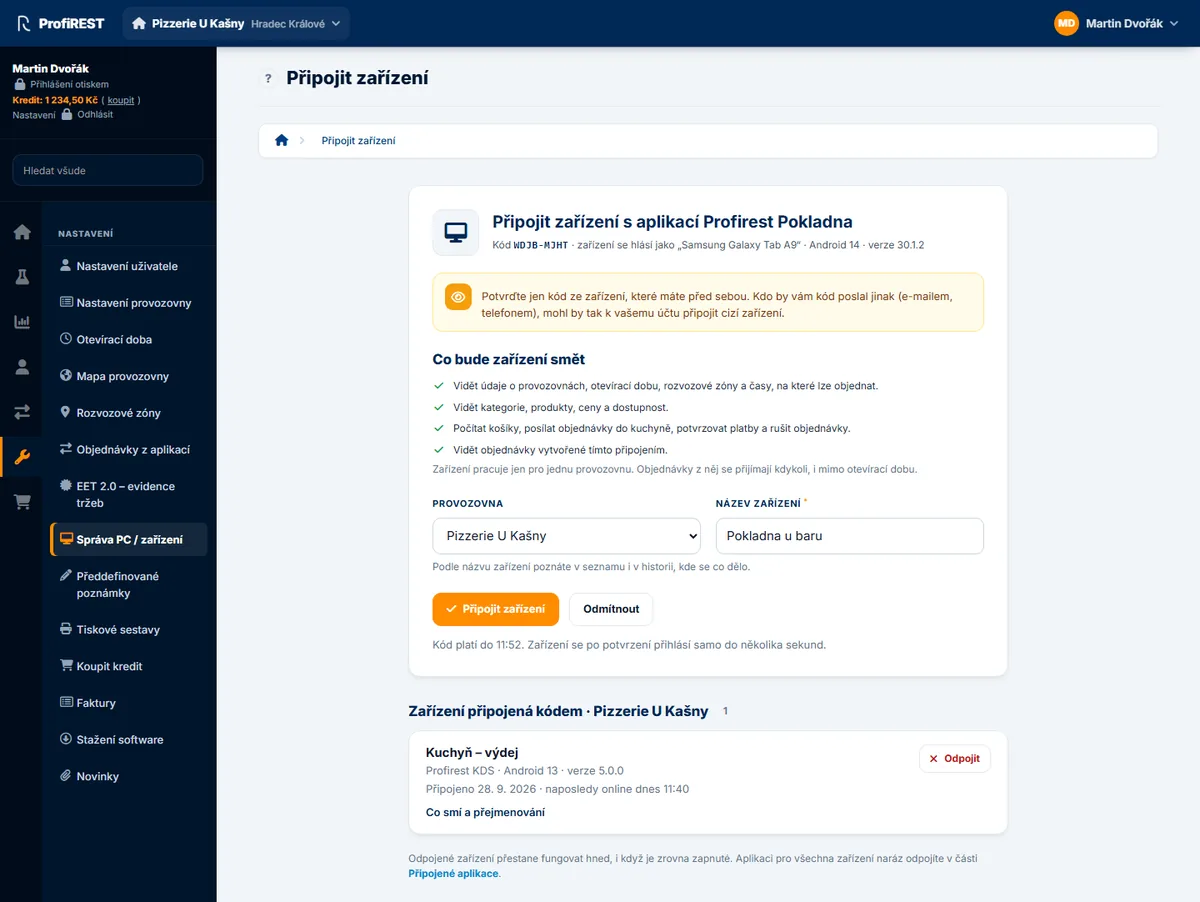
Pokladna, kuchyňský displej, docházkový terminál a telefon kurýra se připojují kódem (RFC 8628). Zařízení ukáže kód, vedoucí ho zadá v administraci (Správa PC / zařízení → Připojit kódem) a vybere provozovnu; zařízení si tokeny vyzvedne samo a pak pracuje jen pro ni. Kód platí 10 minut; knihovna se ptá podle interval (5 s), po slow_down o 5 s déle a výpadek sítě přečká. Odmítnutí vedoucím = access_denied, propadlý kód = expired_token.
A register, kitchen display, attendance terminal and courier phone connect with a code (RFC 8628). The device shows the code, a manager enters it in the administration (PC / devices → Connect a device) and chooses the restaurant; the device collects its tokens itself and then works only for it. The code is valid for 10 minutes; the library polls every interval (5 s), 5 s slower after slow_down, and survives a network outage. A refusal by the manager = access_denied, an expired code = expired_token.
@MainActor
final class AppModel: ObservableObject {
    let api = ProfirestApi(options: .init(
        clientID: "profirest-kds",
        storage: KeychainTokenStorage(),                 // Klíčenka, tokeny se nezálohují na jiné zařízení
        onUnpaired: { _ in Task { @MainActor in AppModel.shared.paired = false } }))
    static let shared = AppModel()
    @Published var paired: Bool
    init() { paired = api.isPaired }
}

struct PairingView: View {
    @EnvironmentObject var model: AppModel
    @State private var code: String?

    var body: some View {
        Text(code ?? "…").font(.system(size: 56, weight: .bold, design: .monospaced))
            .task {                                      // zavření obrazovky úlohu zruší – zruší i párování
                do {
                    let pairing = try await model.api.pair(scope: "restaurants:read kitchen:read kitchen:write",
                                                           deviceName: "KDS kuchyň", appVersion: "2.3.0")
                    code = pairing.userCode              // + QR z pairing.verificationURIComplete
                    try await pairing.connected()        // dotazuje se samo podle intervalu
                    model.paired = true
                } catch let e as ProfirestOAuthError {
                    showError(e.error)                   // access_denied, expired_token
                } catch {}
            }
    }
}
Stav je synchronní: api.isPaired, api.restaurantID, api.deviceID, api.scopes. Kód platí 10 minut – když systém aplikaci mezitím ukončí, uložte pairing.state (Codable) a pokračujte api.resumePairing(state). Bez čekání: try await pairing.poll().
State is synchronous: api.isPaired, api.restaurantID, api.deviceID, api.scopes. The code is valid for 10 minutes – if the system terminates the app meanwhile, save pairing.state (Codable) and continue with api.resumePairing(state). Without waiting: try await pairing.poll().
| AplikaceApplication | client_id |
|---|---|
| Pokladna a mobilní číšníkRegister and mobile waiter | profirest-pos |
| Kuchyňský displej, výdej, pořadníkKitchen display, pickup, queue screen | profirest-kds |
| Docházkový terminálAttendance terminal | profirest-dochazka |
| Telefon kurýraCourier phone | profirest-kuryr |
| Aplikace partnera (e-shop)Partner application (e-shop) | přidělí Profirestassigned by Profirest |
Docházkový terminál
Attendance terminal
POST /v2/restaurants/{restaurant_id}/attendance/punches. Na terminálu se nikdo nepřihlašuje – každé píchnutí nese PIN nebo čip. id vznikne na zařízení ve chvíli píchnutí (UUIDv7 řazené podle času) a stejné id server nikdy nezapíše dvakrát: první zápis vrátí 201, opakování 200 se stejným tělem. Chyby se rozlišují podle kódu, ne podle HTTP stavu.
POST /v2/restaurants/{restaurant_id}/attendance/punches. Nobody signs in on a terminal – every punch carries a PIN or a card. The id is made on the device when the person punches (a time-ordered UUIDv7) and the server never records the same id twice: the first write returns 201, a repeat 200 with the same body. Errors differ by code, not by HTTP status.
let body = AttendancePunchCreate(
    id: ProfirestApi.uuid(),                              // UUIDv7 – opakování se stejným id se nezapíše dvakrát
    type: "clock_in",                                     // clock_out, break_start, break_end
    credential: StaffCredential(method: "pin", secret: pin))
do {
    let punch: AttendancePunch = try await api.post("/restaurants/\(api.restaurantID!)/attendance/punches", body: body)
    showDone(punch.employee.name, punch.state)            // working, on_break, off
} catch let e as ProfirestAPIError {
    switch e.code {
    case ErrorCode.staffAmbiguous: chooseEmployee(e.candidates)   // znovu se stejným id a employeeId
    case ErrorCode.staffCredentialsInvalid: showWrongPin()
    case ErrorCode.staffLocked: showLocked(e.retryAfter)
    case ErrorCode.networkError, ErrorCode.timeout: saveOffline(body)
    default: showMessage(e.title)
    }
}
Bez sítě píchnutí uložte i s id a časem occurred_at a pošlete později dávkou (nejvýš 100) na POST …/attendance/punches/batch – každá položka má vlastní výsledek. Frontu držte jen na zařízení, nese PINy.
Without a network store the punch with its id and occurred_at and send it later in a batch (at most 100) to POST …/attendance/punches/batch – every item gets its own result. Keep the queue on the device only, it carries PINs.
Pokladna a zaměstnanec
Register and employee
Na pokladně se zaměstnanec přihlásí PINem nebo čipem a knihovna pak posílá jeho token v hlavičce Profirest-Staff-Token u každého požadavku sama; token drží jen v paměti. Relace vyprší po nečinnosti (idle_timeout_seconds, každý úspěšný požadavek ji prodlouží) a nejpozději v max_expires_at – počítá se podle hodin zařízení. Stejný PIN víc lidí = 409 staff_ambiguous s kandidáty: nechte vybrat a zavolejte znovu s employee_id. Volba staff u požadavku: automaticky (výchozí – poslat, je-li někdo přihlášený), vyžadovat (bez přihlášení chyba staff_session_required a nic se neodešle), neposílat, nebo konkrétní token.
On a register an employee signs in with a PIN or a card and the library then sends their token in the Profirest-Staff-Token header with every request itself; the token stays in memory only. The session ends after inactivity (idle_timeout_seconds, every successful request extends it) and at max_expires_at at the latest – counted by the device clock. Several people with the same PIN = 409 staff_ambiguous with candidates: let the person choose and call again with employee_id. The staff request option: automatic (default – send it when somebody is signed in), required (without a sign-in the error staff_session_required and nothing is sent), never, or a specific token.
var credential = StaffCredential(method: "pin", secret: pin)          // čip: method: "card"
do {
    try await api.signInStaff(restaurantID: rid, credential: credential)
} catch let e as ProfirestAPIError where e.code == ErrorCode.staffAmbiguous {
    credential.employeeId = try await chooseEmployee(e.candidates)
    try await api.signInStaff(restaurantID: rid, credential: credential)
}
try await api.post("/restaurants/\(rid)/receipts", body: receipt, options: .init(staff: .required))   // bez přihlášení se ani neodešle
await api.signOutStaff()
Aplikace partnera
Partner application
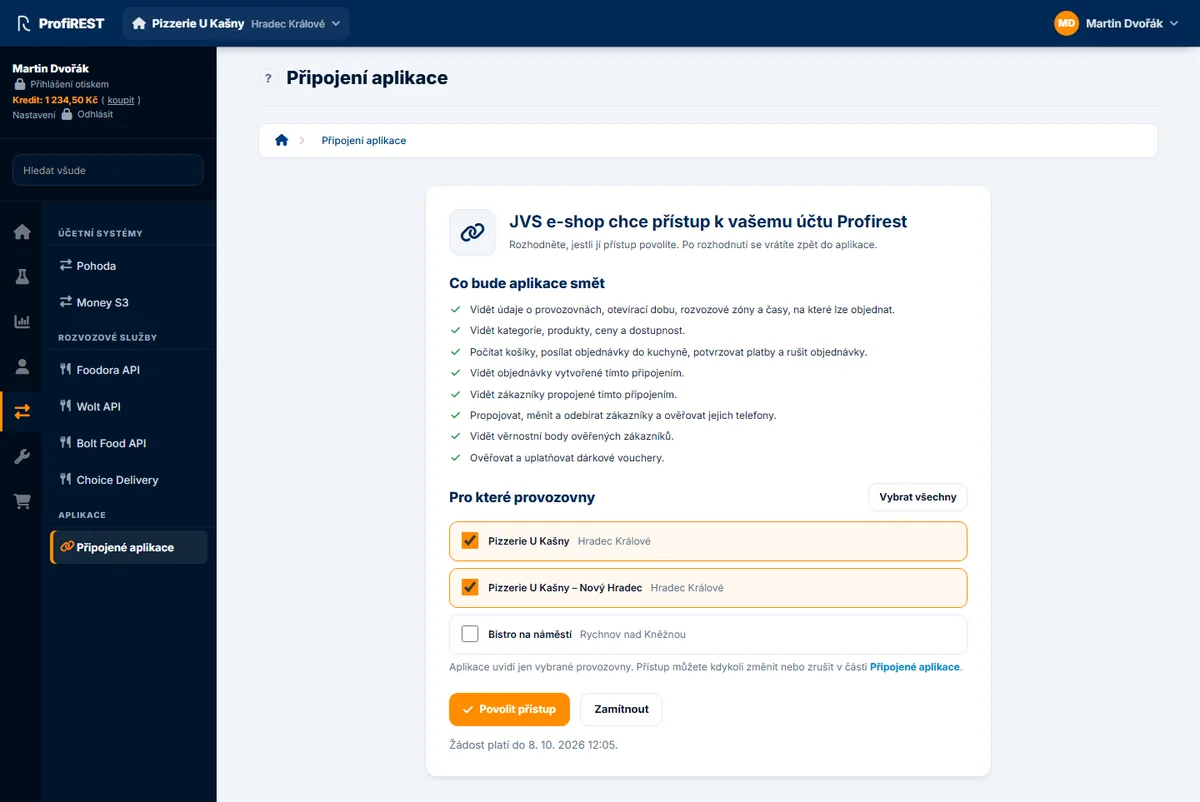
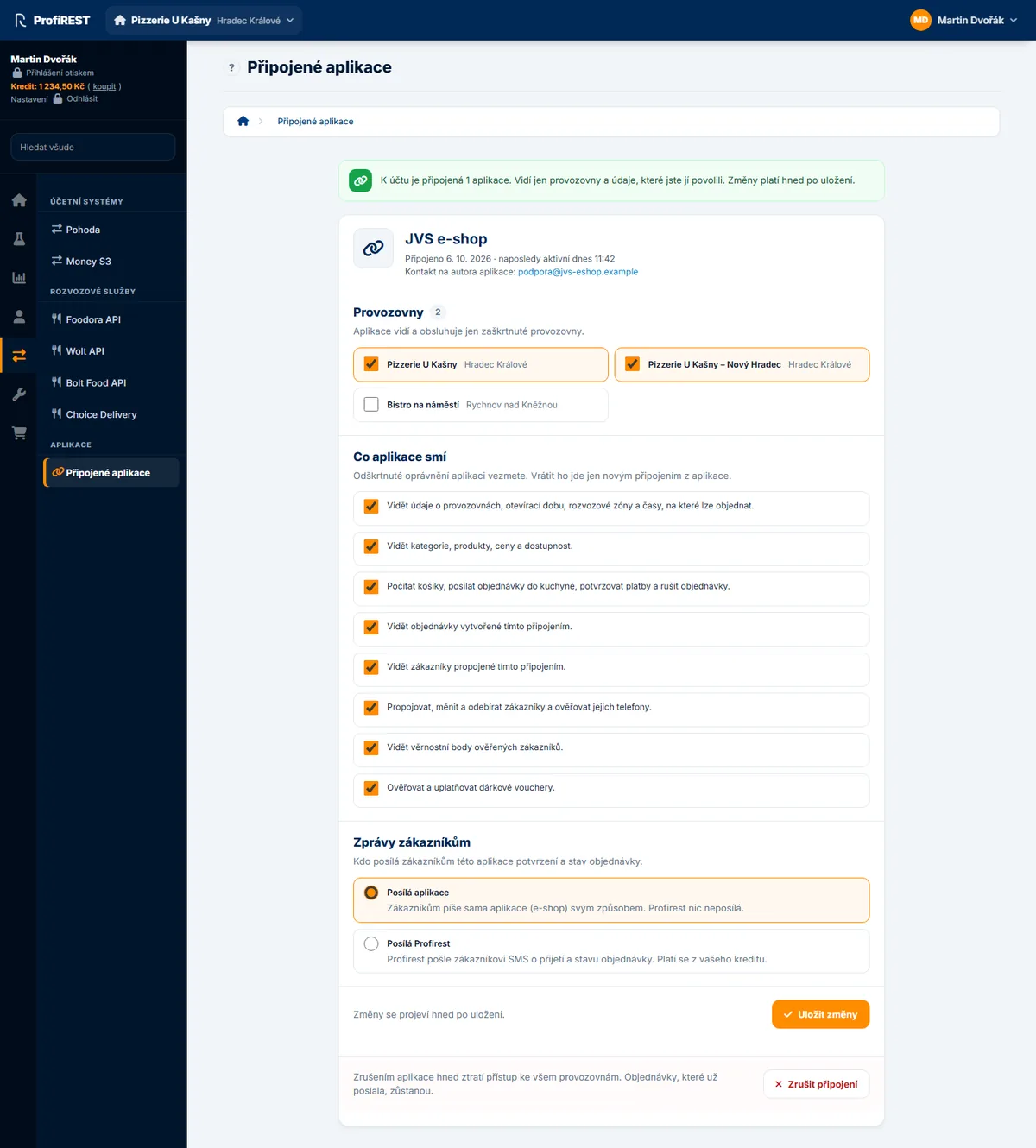
E-shop nebo jiná aplikace partnera se připojuje se souhlasem majitele restaurace (authorization code + PKCE S256). Na serveru je to důvěrný klient: client_secret posílá knihovna jako HTTP Basic (client_secret_basic, RFC 6749 2.3.1) a nikdy nepatří do aplikace u zákazníka. Ověřovač PKCE a state drží mezi přesměrováním a zpětným voláním úložiště; zpětné volání ověří state a iss (RFC 9207) a vymění kód za tokeny. Jedna instance = jedno připojení: tokeny i rozpracovaný souhlas leží pod jedním klíčem úložiště a výchozí klíč (profirest-api:<clientId>) je jeden pro celou aplikaci. Pro každý připojený účet proto použijte vlastní instanci s vlastním klíčem úložiště odvozeným z ID účtu ve vašem systému (znáte ho už před přesměrováním) – se společným klíčem by souhlas dalšího majitele přepsal tokeny předchozího a dva souběžné souhlasy by si přepsaly state. Víc provozoven jednoho majitele je jedno připojení. Když už token máte odjinud, předejte ho jako pevný access token – knihovna ho pošle a nikdy neobnovuje.
An e-shop or another partner application connects with the consent of the restaurant owner (authorization code + PKCE S256). On a server it is a confidential client: the library sends the client_secret as HTTP Basic (client_secret_basic, RFC 6749 2.3.1) and it never belongs into an app on the customer's device. The PKCE verifier and state are kept in the storage between the redirect and the callback; the callback checks state and iss (RFC 9207) and exchanges the code for tokens. One instance = one connection: the tokens and a consent in progress sit under one storage key, and the default key (profirest-api:<clientId>) is one for the whole application. So use a separate instance with its own storage key for every connected account, derived from the account ID in your system (you know it before the redirect) – with a shared key the consent of the next owner would overwrite the tokens of the previous one and two concurrent consents would overwrite each other's state. Several restaurants of one owner are one connection. When you already have a token from elsewhere, pass it as a fixed access token – the library sends it and never refreshes it.
let api = ProfirestApi(options: .init(clientID: "moje-aplikace", storage: KeychainTokenStorage()))
let url = try api.authorizationURL(redirectURI: "mojeaplikace://profirest", scope: "restaurants:read orders:read")

let callback: URL = try await withCheckedThrowingContinuation { cont in
    let session = ASWebAuthenticationSession(url: url, callbackURLScheme: "mojeaplikace") { url, error in
        if let url { cont.resume(returning: url) } else { cont.resume(throwing: error ?? CancellationError()) }
    }
    session.presentationContextProvider = presenter
    session.start()
}
let connection = try await api.completeAuthorization(callback)   // ověří state a iss, vymění kód za tokeny
Server partnera (Swift na Linuxu, Vapor) může být důvěrný klient s clientSecret a FileTokenStorage; parametry zpětného volání předá completeAuthorization(parameters:). V aplikaci na zařízení tajemství nikdy nemějte.
A partner server (Swift on Linux, Vapor) can be a confidential client with clientSecret and FileTokenStorage; it passes the callback parameters to completeAuthorization(parameters:). Never keep the secret in an app on a device.
Požadavky
Requests
Cesty se píšou relativně k /v2, přesně jako v referenci (/oauth/… a /.well-known/… jdou od kořene). Tělo: objekt nebo model → JSON; řetězec nebo bajty → syrově s typem obsahu (zálohy ZIP). Dotaz: prázdné hodnoty se vynechají, pole se spojí čárkou. Odpověď: JSON dekódovaný, 204 nic, jiný obsah bajty. U POST pošle knihovna vlastní Idempotency-Key a při automatickém opakování stejný; když požadavek opakujete vy (po restartu aplikace), předejte vlastní klíč uložený u záznamu. Klíč knihovny žije jen v paměti procesu, po pádu aplikace ho nemáte – u zápisů, které se nesmí provést dvakrát (objednávka), proto vlastní klíč vytvořte a uložte k záznamu dřív, než požadavek odešlete (server výsledek drží 24 hodin). Objednávka má navíc pojistky nezávislé na klíči: kalkulace jde použít jen jednou (409 quote_already_used) a external_id je trvalé (409 external_id_conflict); obě chyby nesou ID existující objednávky. Tokeny (Authorization i Profirest-Staff-Token) odcházejí jen na adresu API, nikdy na cizí absolutní adresu; přesměrování se nesledují.
Paths are written relative to /v2, exactly as in the reference (/oauth/… and /.well-known/… go from the root). Body: an object or a model → JSON; a string or bytes → raw with a content type (ZIP backups). Query: empty values are left out, arrays are joined with a comma. Response: JSON decoded, 204 nothing, other content bytes. For a POST the library sends its own Idempotency-Key and the same one on an automatic retry; when you repeat a request yourself (after an application restart), pass your own key stored with the record. The library's key lives only in the memory of the process, after a crash you do not have it – for writes that must not happen twice (an order) create your own key and store it with the record before you send the request (the server keeps the result for 24 hours). An order also has guards that do not depend on the key: a quote can be used only once (409 quote_already_used) and external_id is permanent (409 external_id_conflict); both errors carry the ID of the existing order. Tokens (Authorization and Profirest-Staff-Token) go only to the API address, never to a foreign absolute URL; redirects are not followed.
let catalog: Catalog = try await api.get("/restaurants/11/catalog", options: .init(query: ["channel": "pos"]))

// stav a hlavičky (ETag, Location)
let r = try await api.send("GET", "/customers/\(id)")
try await api.patch("/customers/\(id)", body: ["name": "Jana Nováková"], options: .init(ifMatch: r.header("ETag")))

// vlastní Idempotency-Key uložený u objednávky
let order: Order = try await api.post("/restaurants/11/orders", body: orderCreate,
                                      options: .init(idempotencyKey: .key("order-\(localID)")))

// binární tělo a stažení
try await api.post("/restaurants/\(rid)/backups", body: .data(zipData, contentType: "application/zip"))
let zip: Data = try await api.get("/restaurants/\(rid)/backups/\(backupID)/content", options: .init(accept: "application/zip"))
Seznamy po stránkách
Paged lists
Seznamy vrací {data, next_cursor}. Knihovna projde stránky sama (všechny položky najednou, nebo stránku po stránce); konec je stránka bez next_cursor nebo prázdná stránka. Kurzor je neprůhledný řetězec – nikdy ho neskládejte.
Lists return {data, next_cursor}. The library walks the pages itself (all items at once, or page by page); the end is a page without next_cursor or an empty page. The cursor is an opaque string – never build one.
let staff: [StaffMember] = try await api.all("/restaurants/11/staff")
for try await page in api.pages("/restaurants/11/attendance/presence", as: AttendancePresencePage.self) {
    render(page.data)
}
Proud událostí
Event feed
Proud událostí knihovna čte dokola. Když běží služba proudu, čte živě GET /v2/events/stream (Server-Sent Events) – událost přijde pár sekund po změně a nic se nedotazuje. Když neběží (503), na starším serveru nebo s vlastním transportem, který neumí číst odpověď po kouscích, čte GET /v2/events a o proud se pokusí znovu za Retry-After (výchozí 5 minut). Kurzor je v obou stejný (u proudu jde jako Last-Event-ID), přechod nic nepřeskočí; výpadek spojení není chyba – připojí se znovu za 2 s, 4 s, po třetím nezdaru minutu dotazuje. Volba stream (výchozí zapnuto; vypnuto = jen dotazování) a dotaz, zda teď běží proud, mají jména podle jazyka (viz Metody); krok pro cron (once) dělá dál jeden dotaz GET /v2/events. Kurzor posune a uloží až po úspěšném zpracování – událost tak přijde aspoň jednou, zpracování má být idempotentní (např. podle id události). Plnou stránku dožene hned, jinak čeká interval (5 s); bez uloženého kurzoru začne na konci proudu. Po 410 cursor_expired zavolá obsluhu resetu (načtěte si stav znovu), při chybě čeká podle Retry-After nebo déle a déle (až 60 s) a ztráta spárování čtení ukončí. limit je nejvýš 100. Kurzor leží v úložišti pod events_cursor[:provozovna][:typy].
The library reads the event feed in a loop. While the stream service runs, it reads GET /v2/events/stream live (Server-Sent Events) – an event arrives a few seconds after the change and nothing is polled. When it does not run (503), on an older server or with a custom transport that cannot read a response in pieces, it reads GET /v2/events and tries the stream again after Retry-After (5 minutes by default). The cursor is the same in both (the stream gets it as Last-Event-ID), switching skips nothing; a dropped connection is not an error – it reconnects after 2 s, 4 s, and after the third failure polls for a minute. The stream option (on by default; off = polling only) and the query whether the stream runs now are named per language (see Methods); the cron step (once) still makes one GET /v2/events request. It moves and stores the cursor only after successful processing – an event arrives at least once, so processing should be idempotent (for example by the event id). A full page is caught up at once, otherwise it waits the interval (5 s); without a stored cursor it starts at the end of the feed. After 410 cursor_expired it calls the reset handler (reload your state), on an error it waits per Retry-After or longer and longer (up to 60 s), and losing the pairing ends the reading. limit is at most 100. The cursor lives in the storage under events_cursor[:restaurant][:types].
let feed = api.watchEvents(.init(
    restaurantID: rid,
    types: ["kitchen.ticket_updated", "order.created", "order.status_changed"],
    onEvents: { _ in await reloadBoard() },               // výjimka = stránka přijde znovu
    onReset: { _ in await reloadBoard() }))
// onDisappear: feed.cancel()
// jedna stránka (BGAppRefreshTask): try await api.eventWatcher(.init(restaurantID: rid, onEvents: { … })).once()
Chyby
Errors
Každá chyba API přijde jako výjimka s kódem z katalogu (RFC 9457). Rozhodujte se podle kódu, ne podle HTTP stavu – kódy se nikdy nemění, nové mohou přibýt. Název pro člověka je česky nebo anglicky podle volby jazyka.
Every API error arrives as an exception with a code from the catalog (RFC 9457). Decide by the code, not by the HTTP status – codes never change, new ones may come. The title for a person is in Czech or English depending on the language option.
do {
    try await api.post("/restaurants/\(rid)/quotes", body: quote)
} catch let e as ProfirestAPIError {
    if e.code == ErrorCode.validationFailed {
        for f in e.errors { print("\(f["pointer"]?.stringValue ?? ""): \(f["message"]?.stringValue ?? "")") }
    }
    log("Profirest \(e.code) (\(e.requestID ?? ""))")
}| VlastnostProperty | ObsahContent |
|---|---|
| code | kód z katalogu (konstanty ErrorCode)the catalog code (constants in ErrorCode) |
| status | HTTP stav; 0 = odpověď nepřišlaHTTP status; 0 = no answer |
| title, detail, message | text pro člověka; message = title – detailtext for a person; message = title – detail |
| errors | chyby polí: pointer, code, messagefield errors: pointer, code, message |
| candidates | kandidáti u staff_ambiguouscandidates for staff_ambiguous |
| existingID | existující objekt u konfliktůthe existing object for conflicts |
| retryAfter, retryable | sekundy z Retry-After, zda knihovna opakujeseconds from Retry-After, whether the library retries |
| requestID, problem, problemModel | ID požadavku pro podporu, celé tělo chybyrequest ID for support, the whole error body |
| ProfirestOAuthError | chyby párování a připojení: error, detailpairing and connection errors: error, detail |
| ProfirestUsageError | špatné použití knihovny (pair bez clientID…)library misuse (pair without clientID…) |
| CancellationError | zrušená úloha (párování, požadavek)a cancelled task (pairing, request) |
Kódy jen z knihovny
Library-only codes
| KódCode | StavStatus | KdyWhen |
|---|---|---|
| network_error | 0 | server nejde zastihnout (bez sítě, DNS); opakovatelnéthe server cannot be reached (no network, DNS); retryable |
| timeout | 0 | odpověď nepřišla včas; opakovatelnéno answer in time; retryable |
| not_paired | 401 | zařízení nemá tokeny nebo ho server odpároval – spárujte znovuthe device has no tokens or the server unpaired it – pair again |
| unexpected_redirect | 3xx | server odpověděl přesměrováním; knihovna ho nesleduje, aby tokeny neodešly jinam (Location je v detailu); neopakuje sethe server answered with a redirect; the library does not follow it so tokens never go elsewhere (Location is in the detail); not retried |
| staff_session_required | 403 | požadavek vyžaduje přihlášeného zaměstnance – nic se neodeslalothe request requires a signed-in employee – nothing was sent |
Opakování a výpadky
Retries and outages
Knihovna opakuje jen to, co opakovat jde, nejvýš 3× se stejným tělem a Idempotency-Key. Odstup se zdvojnásobuje od 1 s do 30 s s rozptylem ±25 %, aby se zařízení po výpadku nevrátila všechna najednou. Retry-After (sekundy i HTTP datum) má přednost; delší než 30 s knihovna nečeká a vrátí chybu s počtem sekund.
The library retries only what can be retried, at most 3× with the same body and Idempotency-Key. The delay doubles from 1 s up to 30 s with ±25 % jitter so devices do not all come back at once after an outage. Retry-After (seconds or an HTTP date) wins; the library does not wait longer than 30 s and returns the error with the seconds.
| OdpověďResponse | OpakujeRetried | PoznámkaNote |
|---|---|---|
| network_error, timeout | anoyes | i POST – Idempotency-Key je stejnýPOST too – the Idempotency-Key is the same |
| 429 rate_limited | anoyes | po Retry-Afterafter Retry-After |
| 409 idempotency_in_progress | anoyes | stejný požadavek ještě běžíthe same request is still running |
| 500, 502, 503, 504 | anoyes | |
| 401 invalid_token | jednouonce | po obnově tokenu (nepočítá se do opakování)after refreshing the token (not counted) |
| 429 staff_locked | neno | zámek po špatných PINech – ukažte, kdy to zkusita lock after wrong PINs – show when to try |
| ostatní 4xxother 4xx | neno | opravte požadavek nebo ukažte název chybyfix the request or show the error title |
Tokeny a úložiště
Tokens and storage
Stav klienta (tokeny, provozovna zařízení, kurzory událostí) ukládá rozhraní úložiště se třemi metodami – načíst, uložit a smazat řetězec. Paměťové úložiště vydrží do konce procesu, souborové drží JSON s právy jen pro vlastníka. Access token platí 30 minut; knihovna ho obnoví minutu před koncem a po 401 invalid_token. Refresh token veřejného klienta platí jen na jedno použití – sdílí-li úložiště víc procesů, obnovuje pod zámkem úložiště jen jeden a ostatní použijí jeho nový token. invalid_grant (zařízení odpárováno) tokeny smaže a zavolá obsluhu odpárování; invalid_client a unauthorized_client jsou přechodné a tokeny nechá. Pod klíčem profirest-api:<client_id> leží JSON se stejnými klíči ve všech knihovnách.
The client state (tokens, the device's restaurant, event cursors) is kept by a storage interface with three methods – read, write and delete a string. Memory storage lasts until the process ends; file storage keeps JSON readable by the owner only. An access token is valid for 30 minutes; the library refreshes it a minute before the end and after 401 invalid_token. A public client's refresh token is single-use – when several processes share the storage, only one refreshes under the storage lock and the others use its new token. invalid_grant (device unpaired) deletes the tokens and calls the unpaired handler; invalid_client and unauthorized_client are temporary and keep them. Under the key profirest-api:<client_id> lies JSON with the same keys in every library.
// aplikace: Klíčenka (iOS, iPadOS, macOS)
let api = ProfirestApi(options: .init(clientID: "profirest-pos", storage: KeychainTokenStorage(service: "cz.firma.pokladna")))
// server a příkazová řádka: JSON soubor se zámkem mezi procesy
let api = ProfirestApi(options: .init(clientID: "muj-eshop", storage: FileTokenStorage(path: "/var/lib/eshop/tokens.json")))
MemoryTokenStorage() (výchozí) vydrží do konce procesu. FileTokenStorage zamyká <soubor>.lock (flock, na Windows LockFileEx) a uvnitř zámku stav načte znovu. Vlastní úložiště implementuje TokenStorage (get, set, remove), se zámkem mezi procesy LockingTokenStorage. Sdílíte-li Klíčenku s rozšířením (accessGroup), obnovujte tokeny jen v hlavní aplikaci.
MemoryTokenStorage() (default) lasts until the process ends. FileTokenStorage locks <file>.lock (flock, LockFileEx on Windows) and reloads the state inside the lock. A custom storage implements TokenStorage (get, set, remove), with a lock across processes LockingTokenStorage. If you share the Keychain with an extension (accessGroup), refresh tokens in the main app only.
Reference
Volby klienta
Client options
let api = ProfirestApi(options: .init(clientID: "…", storage: …))| VolbaOption | VýchozíDefault | VýznamMeaning |
|---|---|---|
| baseURL | https://api.mujprofirest.cz | adresa APIAPI address |
| clientID | – | client_id aplikaceyour client_id |
| clientSecret | – | jen důvěrný klient na serverua confidential client on a server only |
| accessToken | – | pevný token bez obnovya fixed token, never refreshed |
| language | "cs" | jazyk názvů chyb; nil = bez hlavičkylanguage of error titles; nil = no header |
| storage, storageKey | MemoryTokenStorage(), profirest-api:<clientID> | úložiště stavu a klíčstate storage and key |
| retries | 3 | opakování opakovatelných chybretries of retryable errors |
| retryDelay | 1.0 s | první odstupthe first delay |
| maxRetryWait | 30 s | nejdelší Retry-Afterthe longest Retry-After |
| timeout | 30 s | limit jednoho pokusu včetně tělalimit of one attempt including the body |
| refreshMargin | 60 s | kolik před koncem obnovit tokenhow long before the end to refresh |
| onUnpaired, onStaffExpired | – | ztráta spárování / konec relace zaměstnancelost pairing / end of the staff session |
| transport | URLSessionTransport | vlastní HTTPTransport (proxy, testy)your own HTTPTransport (proxy, tests) |
| clock, sleep | – | hodiny a uspání pro testy bez čekáníclock and sleep for tests without waiting |
Metody
Methods
| MetodaMethod | VracíReturns | Co děláWhat it does |
|---|---|---|
| pair(scope:deviceName:devicePlatform:appVersion:) | Pairing | userCode, verificationURIComplete, connected(), poll(), cancel(), state |
| resumePairing(_:) | Pairing | pokračování ze PairingStatecontinue from a PairingState |
| isPaired, restaurantID, deviceID, scopes | Bool, String?, String?, [String] | stav spárovánípairing state |
| connection(), unpair() | Connection, Void | připojení; zapomenout spárováníconnection; forget the pairing |
| authorizationURL(redirectURI:scope:prompt:), completeAuthorization(_:) | URL, Connection | připojení partnera (PKCE)partner connection (PKCE) |
| signInStaff(restaurantID:credential:), signOutStaff(token:), staff | StaffSession, Void, StaffInfo? | zaměstnanec a jeho relacethe employee and their session |
| get, post, put, patch, delete, request | JSONValue?, model, Data | typ výsledku určuje let x: Model nebo as:the result type comes from let x: Model or as: |
| send(_:_:body:options:), getData(_:options:) | APIResponse, Data? | stav, hlavičky a bajty odpovědistatus, headers and response bytes |
| pages(_:as:), all(_:as:) | AsyncThrowingStream, [T] | stránky seznamu, všechny položkylist pages, all items |
| watchEvents(_:), eventWatcher(_:) | Task<Void, Never>, EventWatcher | čtení na pozadí (cancel()) – živý proud, bez služby dotazování (stream, streamIdleTimeout); run(), once() (jeden dotaz), stop(), isStreamingbackground reading (cancel()) – live stream, polling without the service (stream, streamIdleTimeout); run(), once() (one request), stop(), isStreaming |
| ProfirestApi.uuid() | String | UUIDv7 pro id záznamůa UUIDv7 for record ids |
| OfflineApprovals.verifyPin(_:pin:), sign(_:pin:receipt:), message(_:) | Bool, String, String (throws) | offline schválení účtenky vedoucím: kontrola překlepu v PINu (offline_approval.check, jen 8 bitů) a approval_signature; podpis ověří serveroffline approval of a receipt by a manager: a PIN typo check (offline_approval.check, only 8 bits) and the approval_signature; the server verifies the signature |
Volby požadavku RequestOptions: query, idempotencyKey (.auto, .none, .key(…) nebo řetězec), ifMatch, ifNoneMatch, staff (.auto, .required, .none, .token(…)), retries, timeout, accept, contentType, headers, auth. Tělo: slovník nebo pole literálem, model (Encodable), .data(bajty, contentType:), .text(…).
Request options RequestOptions: query, idempotencyKey (.auto, .none, .key(…) or a string), ifMatch, ifNoneMatch, staff (.auto, .required, .none, .token(…)), retries, timeout, accept, contentType, headers, auth. Body: a dictionary or array literal, a model (Encodable), .data(bytes, contentType:), .text(…).
Bezpečnost
Security
client_secretpatří jen na server, nikdy do aplikace na zařízení nebo v prohlížeči.client_secretbelongs on a server only, never into an app on a device or in a browser.- Tokeny zařízení patří zařízení a jen jeho provozovně. Soubor s tokeny chraňte jako heslo; ztracené zařízení odpárujte v administraci – tokeny přestanou platit hned.
- Device tokens belong to the device and its restaurant only. Protect the token file like a password; unpair a lost device in the administration – its tokens stop working at once.
- Token zaměstnance zůstává jen v paměti a končí nečinností. PIN knihovna nikam neukládá.
- The staff token stays in memory only and ends with inactivity. The library never stores a PIN.
- Tokeny odcházejí jen na adresu API; přesměrování se nesledují.
- Tokens go only to the API address; redirects are not followed.
- Offline fronta docházkového terminálu nese PINy – držte ji jen na zařízení a po odeslání ji smažte.
- The offline queue of an attendance terminal carries PINs – keep it on the device only and delete it after sending.
Změny
Changes
| VerzeVersion | ZměnaChange |
|---|---|
| 1.0.0 | První verze pro Swift 5.9+: klient bez závislostí pro iOS, iPadOS, macOS, Linux a Windows (async/await, obnova tokenu v actoru), párování se zrušením úlohou, OAuth s PKCE, Klíčenka a soubor se zámkem, zaměstnanci, opakování, stránkování (AsyncThrowingStream), proud událostí, Codable modely, příkladový klient.First version for Swift 5.9+: a client without dependencies for iOS, iPadOS, macOS, Linux and Windows (async/await, token refresh in an actor), pairing cancelled with the task, OAuth with PKCE, the Keychain and a locked file, employees, retries, paging (AsyncThrowingStream), the event feed, Codable models, the example client. |